

Identify the response branch
An acknowledgment such as “I’ll analyze this” is not the final result when a task block is still Running or Waiting for you.
Review a direct answer
A direct answer stays in the conversation. It may include source disclosures or tool results, but it does not create a separate task row unless a longer run is also attached. Before you use it:- Match the answer to the attached record and requested workspace.
- Confirm the provider account, dates, timezone, currency, attribution view, and filters behind decision-driving figures.
- Separate measured facts from interpretation and generated recommendations.
- Open any linked product record or report instead of treating the prose as the current object state.
- Continue in the same conversation only while the source and authority boundary remain valid.
Answer a clarification
Marketer can ask a question before it finishes the current turn or while a longer run is paused.- When choices are shown, select one and then select Submit.
- Choose Type it your own when the listed options do not express the answer.
- When no options are shown, reply in the ordinary composer.
- Select Dismiss only when you do not want to answer that question now.
Review a proposal to start longer work
Proposal controls depend on what Marketer is preparing.
The exact title and start label appear on the proposal you are reviewing. Use that card as the source of truth instead of assuming every proposal has the same controls.
Cancel the proposal
Choose Cancel when the displayed work should not start. Canceling a proposal is different from stopping a run: a proposal has not created the proposed background run yet.Edit the proposal
Choose Edit or Edit brief when the outcome is useful but its instructions, inputs, output count, steps, or review boundary are wrong. Marketer returns the proposal text to the composer so you can revise it. The old proposal does not continue.Start the proposal
Choose Accept & Run, Approve & Run, or Run it only after you verify:- The requested outcome and attached records
- The workspace evidence the run will use
- Every production or generation step
- The expected output and where it will appear
- The authority boundary for later connected-account changes
Follow the task after it starts
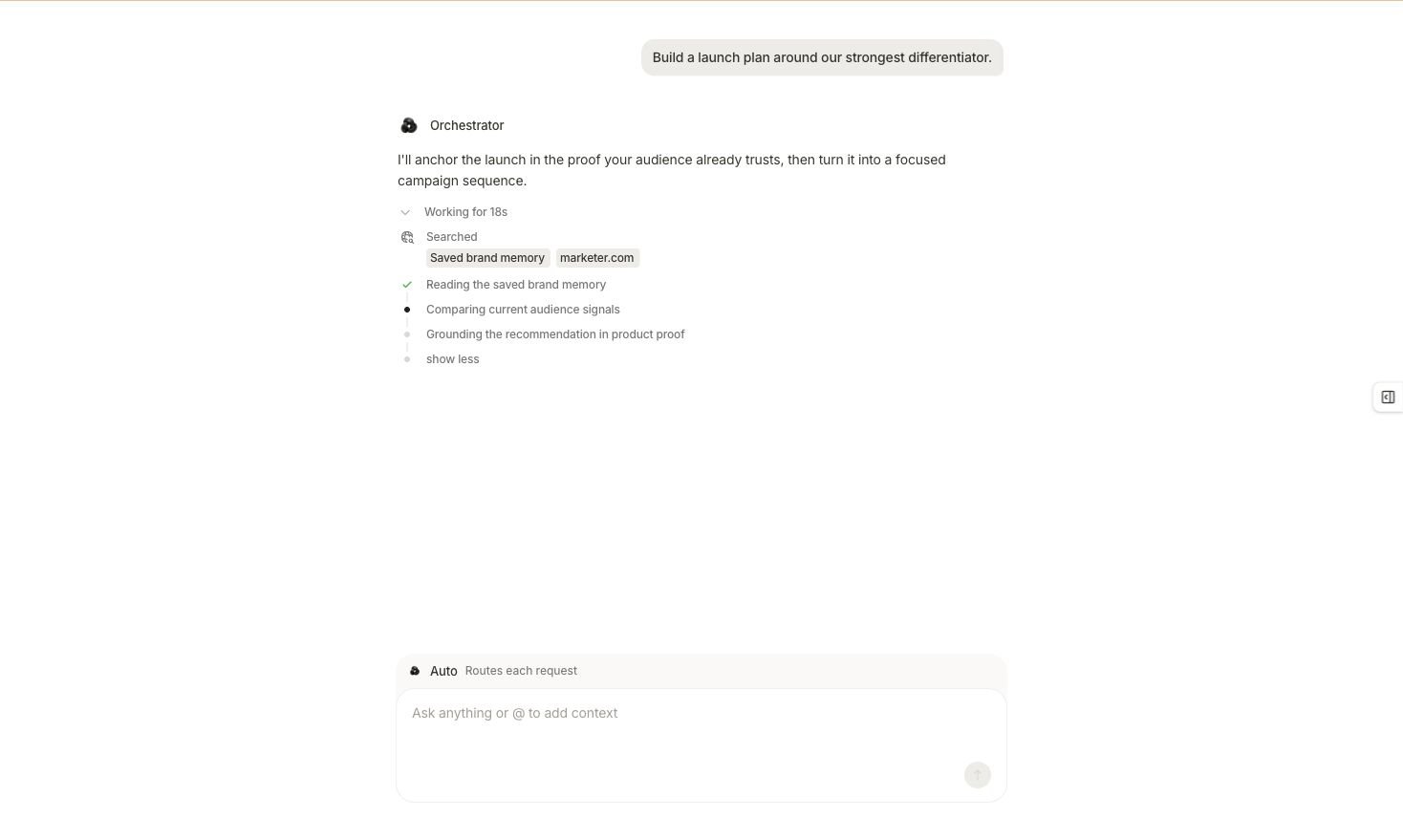
A running turn exposes searched sources, completed work, the current step, and what remains.
- A live Working for… timer
- Searched source chips
- Completed, current, and pending steps
- A task title and step count
- A specialist or nested run in Agents
- Stop while the selected run is non-terminal
Review the terminal result
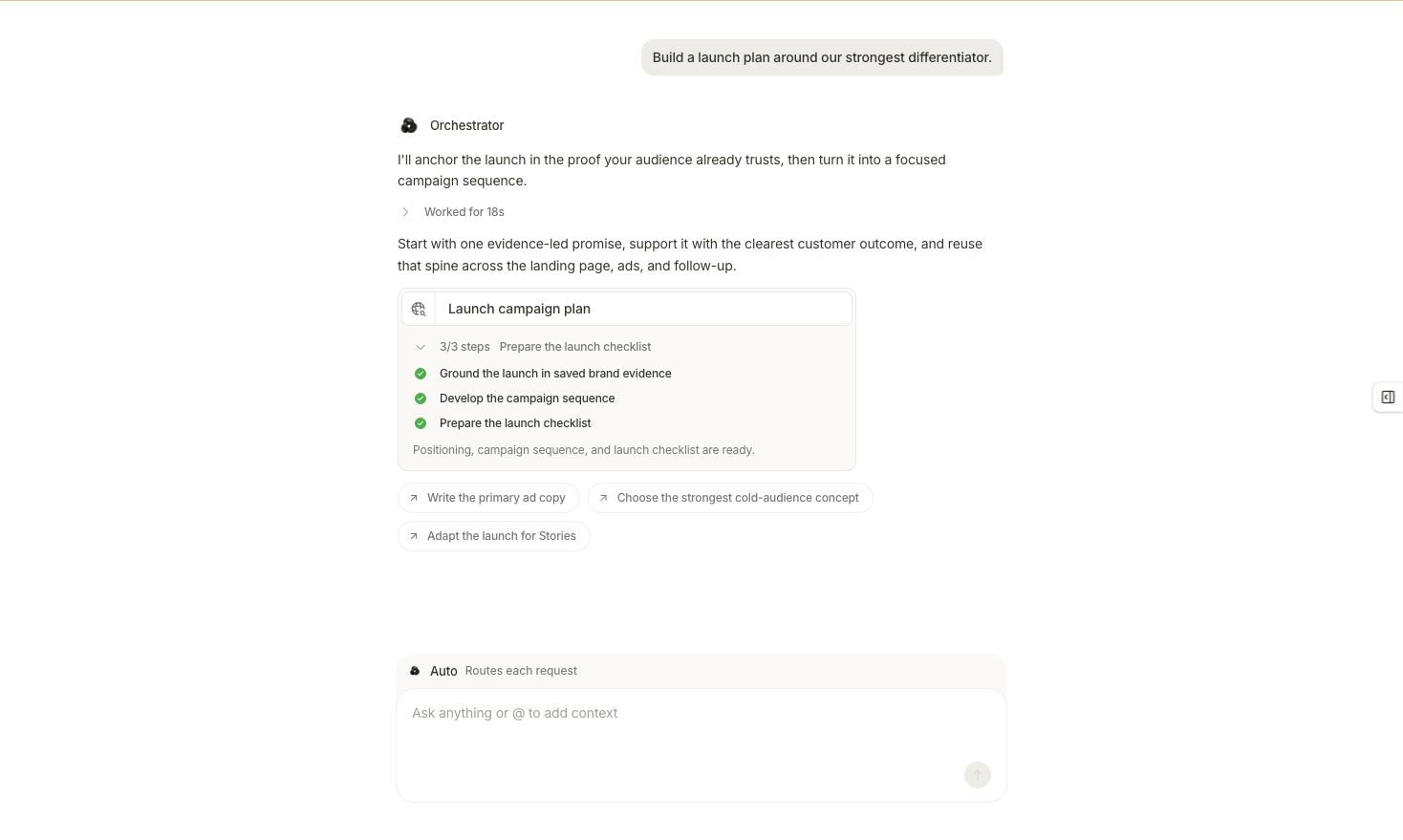
The completed task separates the finished result, checked steps, and optional next requests.
- Read the final lifecycle state.
- Compare the checked steps with the plan you accepted.
- Open Outputs or the linked artifact.
- Verify the deliverable against the original request.
- Confirm any created brief, creative, campaign draft, workflow, or report in its owning surface.
Recover from the wrong branch
I expected a direct answer but received a proposal
I expected a direct answer but received a proposal
Choose Edit or Edit brief and make the boundary explicit: request analysis only, name the final answer, and remove production or generation steps.
I expected a task but received a short answer
I expected a task but received a short answer
State the missing deliverable, steps, evidence, and completion criteria. Ask Marketer to prepare the longer work as a reviewable proposal when you want to inspect it before it starts.
The proposal is broader than my request
The proposal is broader than my request
Edit the proposal. Split unrelated research, creative, campaign, and workflow outputs into separately reviewable runs.
The task is waiting
The task is waiting
Open the selected run and determine whether it needs a question answered or an approval decided. Use the interaction attached to that same run.
The task ended without the expected artifact
The task ended without the expected artifact
Open the final output and Activity detail. Check for failed or partial branches, then retry only the missing part after resolving the cause.
Next step
Questions and approvals
Resolve in-chat questions, tool decisions, and Awaiting-action items.
Task control and recovery
Resume, stop, recover, and verify the selected run.
Inspect specialists
Trace the task into its agents, nested work, sources, and outputs.
Review results
Apply a source, time, scope, calculation, and action-state check.