

Understand the landing page
The landing page is intentionally a slice: Recent artifacts prioritizes a limited set, and the Standing index is compact context rather than the entire knowledge base. Open the artifact or source detail for a decision-grade review.
Choose the right route
Resolve mixed files before upload when possible. A document that combines confidential notes, outdated claims, brand identity, and a procedure is difficult to govern as one source.
Build from a website
Use website research when the approved public brand or storefront site should establish current workspace context.1
Enter the authoritative site
In Sources, provide the canonical domain. Avoid a campaign mirror, unrelated retailer, or regional site that does not own the facts you need.
2
Select Build from website
Confirm the exact domain before starting. The source moves into Brand research running while Marketer gathers and structures available material.
3
Open view progress
Follow the active task and its visible steps. Closing the task does not mark the source complete.
4
Inspect the new context
Return after a terminal state and review the source, standing context, and recent artifacts. Check product claims, audience conclusions, dates, and brand details against the current site.
5
Test one sourced fact
Start a fresh task, ask a question with one verifiable answer from the site, require the source and effective date, then compare the response with the live page.
Upload and route files
The upload surface accepts approved PDFs, Markdown, text, images, and fonts, up to the 100 MB limit displayed by the UI.1
Set Route uploads as
Choose Let the agent decide, Brand kit material, Reference knowledge, or Working procedure before adding files.
2
Add the exact files
Use Drop files or click to upload. Confirm filenames, remove duplicates, and ensure every file opens and contains selectable, understandable content when text extraction is expected.
3
Read the source state
A row can show upload or processing progress before Done, or finish as Failed. Do not test retrieval while it is still processing.
4
Verify the resulting route
Under In your knowledge base, read the arrow destination such as Brand kit, Knowledge, or Skill. The resulting badge, not the original intent, confirms where the source landed.
5
Retry only the failed row
Select Retry after checking file integrity and type. Avoid uploading another identical copy while the original can be recovered.
Change a source destination
Use the row’s route control when a source landed in the wrong place.- Moving a source into Brand kit can start metered re-reading; review the confirmation and displayed usage.
- Moving a source out of Brand kit changes future routing, but details already extracted into the Brand Profile can remain.
- Moving a procedure to Skill creates behavior that needs trigger, scope, body, and negative-trigger review.
- Reopen both the source and destination after processing completes.
Review artifact grounding
Open a row in Recent artifacts and inspect its full detail. Confirm:- Artifact type, title, summary, and date
- The evidence named by Grounded in N
- Which claims come directly from a source
- Which statements are synthesis or recommendation
- Whether a newer or higher-authority source conflicts
Validate Knowledge in a fresh task
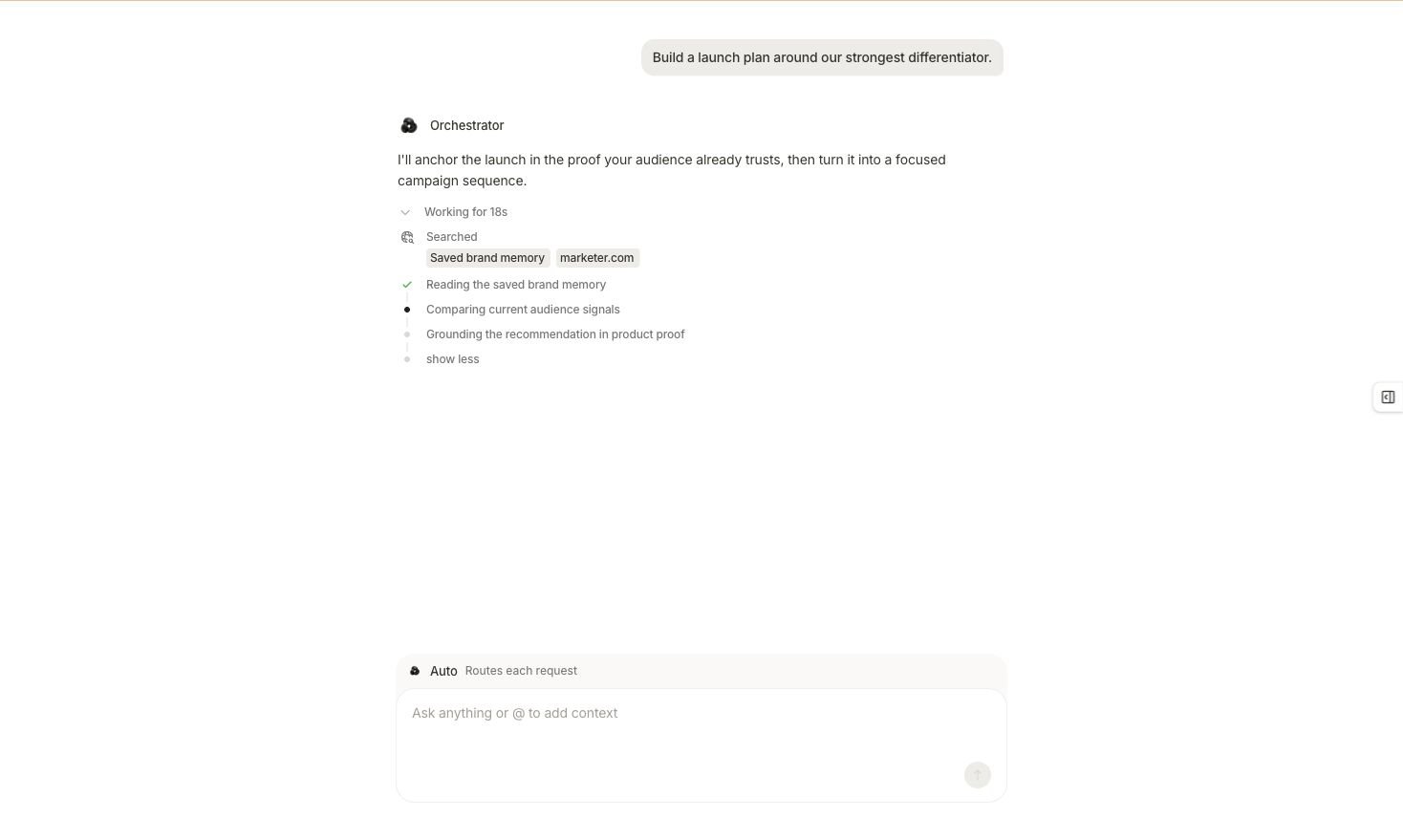
Task progress can show that Marketer searched and read saved workspace context; verify the final fact against the named source.
- Start a new task so prior conversation context does not mask the test.
- Ask one specific question the source can answer.
- Select + → Add context, then attach the relevant product, brief, campaign, or creative when it is part of the question. Use
@only when you want to mention an agent. - Require the source title, cited fact, effective date, and any conflicting source.
- Compare the answer with the uploaded file or live website.
- Correct the source, route, or authority order and retest if the result is stale or ambiguous.
Completion check
- Every source has an owner, date, authority, and intentional route.
- Website and upload work reached a terminal state.
- Failed rows were fixed or deliberately removed.
- Brand kit, Knowledge, and Skill routes match the material’s purpose.
- Important artifacts identify their grounding.
- A fresh task retrieved a known fact and named the correct source and date.
- Conflicting or outdated authorities were resolved.
Troubleshooting
Brand research stays in progress
Brand research stays in progress
Open view progress, inspect the failed or waiting step, and confirm the canonical domain is reachable. Resolve the existing task before starting another identical build.
A file fails
A file fails
Confirm it opens locally, fits the displayed size limit, and uses a supported type. Use Retry on the exact row after correcting a malformed or unreadable export.
The file went to the wrong destination
The file went to the wrong destination
Use the row’s route control and review the move confirmation. After processing, inspect both the new destination and any previously extracted Brand Profile detail.
The agent ignores a source
The agent ignores a source
Confirm the row is Done, the route is correct, and a higher-authority source does not contradict it. Test in a fresh task with the source named explicitly.
An artifact is grounded in stale evidence
An artifact is grounded in stale evidence
Replace or rebuild the outdated source, resolve conflicts, and rerun the decision-grade task. Existing artifacts preserve their earlier context and should not be silently relabeled as current.
Continue
Govern Skills
Turn approved procedures into scoped, testable agent behavior.
Use context in chat
Attach the exact record and verify how the Marketing Agent uses it.