

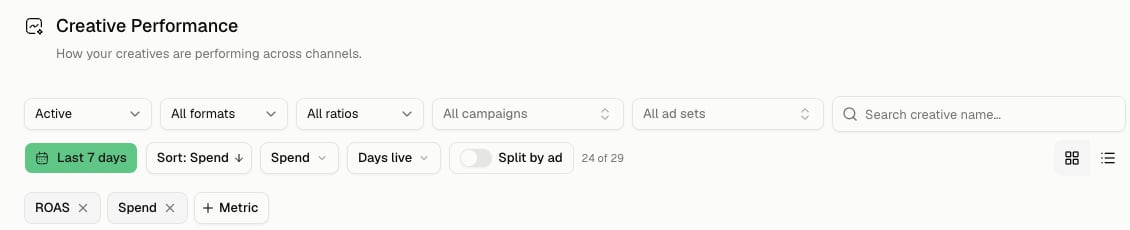
Creative performance keeps every scoping control visible before you compare assets.
Know the data boundary
- The current performance rows come from synced Meta creative delivery.
- Studio-only concepts and manual uploads have no delivery metrics until they are used in a synced Meta ad.
- Creative Assets owns saved and synced files; Creatives owns the performance comparison.
- Date controls scope the metrics. They do not prove when the underlying file was created.
Establish a comparable set
Work from broad scope to narrow scope:1
Set the complete date window
Choose the same complete dates used in the campaign diagnosis. Keep the window fixed while comparing rows.
2
Set delivery status
Choose All status, Active, or Paused. Status describes the linked delivery object, not whether the asset file remains in the library.
3
Set the creative format
Choose All formats, Image, Video, or Carousel. Compare formats together only when the decision genuinely spans them.
4
Set ratio and ownership
Use All ratios or the available aspect ratio. Narrow to All campaigns or one campaign and All ad sets or one ad set when the audience, objective, or placement must be held constant.
5
Constrain delivery volume
Use the Spend range and Days live range controls to avoid calling a low-delivery outlier a winner. Keep minimum evidence requirements consistent across candidates.
6
Choose the result metric and order
Select the metric pill that answers the question, then set Sort. A ranking is only meaningful under the current filters and window.
7
Find and identify the row
Use Search creative name… and switch between grid and table view. Similar thumbnails or names do not prove two rows are the same creative.
Decide when to use Split by ad
By default, Marketer can group delivery around the creative. Turn on Split by ad when you need one row per ad using that creative. Use the grouped view when asking, “How did this creative perform overall?” Use Split by ad when asking, “Did the same creative behave differently in separate ads?” Campaign and ad-set filters apply to the corresponding delivery relationships. If a creative has run in several campaigns, narrowing one parent can materially change its result.Read the comparison
For every candidate:- Confirm its spend and days live are sufficient for the decision.
- Read the outcome metric and its efficiency measure together.
- Compare candidates under compatible campaign objective, audience, placement, format, and delivery volume.
- Look for consistency, not one extreme row.
- Open the detail before carrying the learning forward.
Inspect creative detail
Open a row to inspect the selected creative without losing the comparison frame. The detail can include:- A time-series chart for the selected metric
- Performance totals for the current date window
- Age, Gender, Country, Platform, and Audience breakdown tabs when data is available
- Where live placement and delivery context
- Identifying labels and metadata
- Dynamic-creative or delivery-diagnostic detail when the linked ad supports it
Confirm the asset identity
Before reuse, verify:- Visual and format
- Creative name and linked ad identity
- Campaign and ad set under which it served
- Whether a resized or dynamic variant is represented
- Current status and where it remains live
Turn evidence into a new direction
Carry a creative learning into Briefs as a hypothesis with evidence:Completion check
- Meta is connected and its creative sync covers the selected dates.
- The date, status, format, ratio, campaign, ad set, spend, and days-live filters are recorded.
- Every comparison uses the same row grain.
- Candidates have compatible delivery conditions and sufficient evidence.
- The detail view confirms the creative identity and where it served.
- Breakdowns were used to test, not merely decorate, the explanation.
- The resulting brief states the observed fact, hypothesis, controlled variables, and next test separately.
Troubleshooting
Setting up your creatives does not finish
Setting up your creatives does not finish
Open Meta in Integrations and inspect authorization, selected ad account, and sync coverage. Return after the import completes; do not treat placeholders as zero delivery.
Creative sync needs attention
Creative sync needs attention
Repair the named Meta connection or sync issue, then retry the affected source. Keep the original date frame so the refreshed result can be compared directly.
A known creative is missing
A known creative is missing
Reset status, format, ratio, campaign, ad set, spend, days-live, search, and date filters. Confirm the creative actually delivered from the connected Meta account in that window.
Grouped and ad-level numbers differ
Grouped and ad-level numbers differ
Check Split by ad. The grouped row can represent delivery across several ads; the split view shows each ad separately. Choose one grain for the question.
The detail shows an unexpected audience result
The detail shows an unexpected audience result
Confirm the date window and parent campaign/ad set, then inspect the relevant Audience, Country, Platform, Age, or Gender tab. A concentrated segment can explain the aggregate without applying to every viewer.
Continue
Find the reusable asset
Inspect the file, copy, labels, usage, and linked ad states.
Write the next brief
Turn a supported learning into controlled production direction.