

Start on Home
Open Marketer and confirm the workspace name in the upper-left corner before you submit anything. The active workspace determines which connected accounts, Knowledge, campaigns, briefs, creatives, products, and controls the agent can use.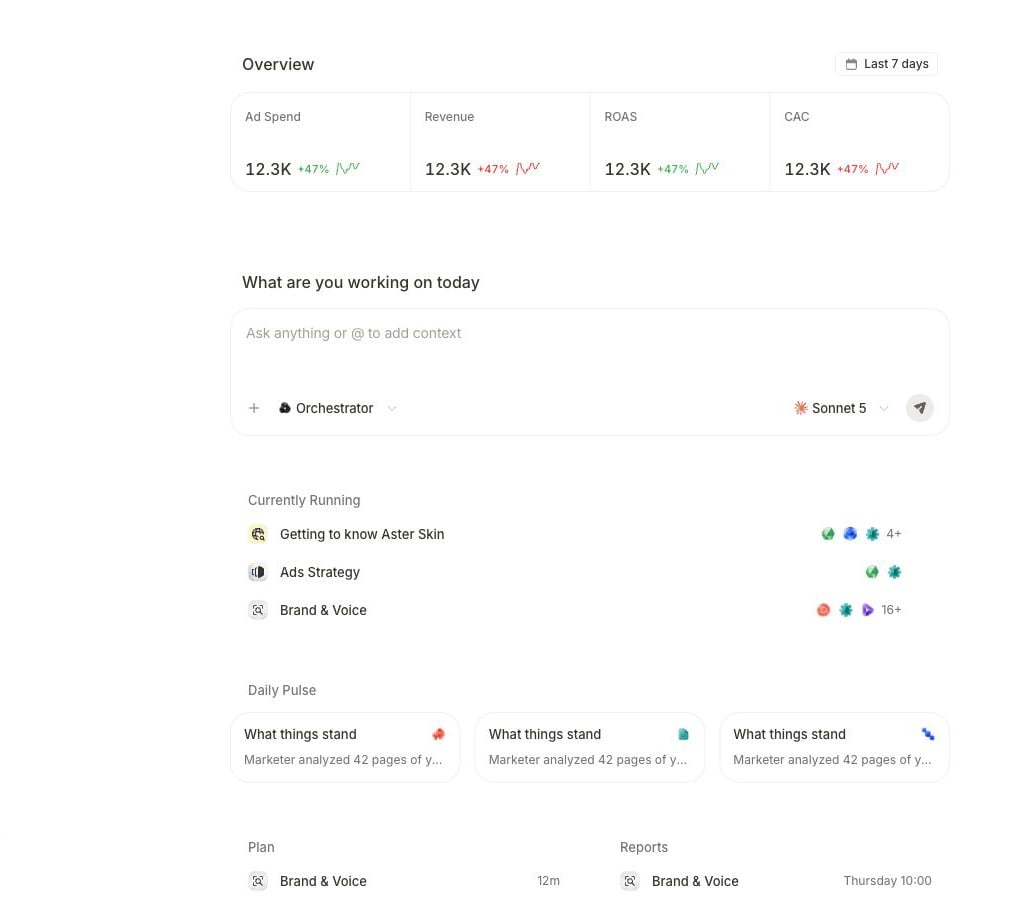
The Home canvas combines performance context, the request composer, active work, and recent summaries.
- Confirm the workspace. Switch workspaces if the visible name is not the company you intend to work with.
- Check the available context. The overview and recent work help you see whether you are starting from the expected business state.
- Write the outcome. Use Ask anything or @ to add context to describe the question, artifact, or decision you need.
- Attach the exact record when scope matters. Select + and choose a campaign, brief, creative, or product instead of relying on a similar name. Use
@to mention an agent. - Follow the work. A request can answer in chat, continue as a task, ask for clarification, or stop on a proposal that needs your decision.
The product flow
Every useful request moves through the same five layers, even when the work itself differs.Answer flow
Use this for analysis and other read-only work:- Ask a bounded question on Home.
- Let Marketer read the connected source and workspace context.
- Open the completed result.
- Verify its source, dates, scope, calculation, and limitations.
- Ask a follow-up or continue in the relevant product area.
Action flow
Work that can create or change something has an additional decision boundary. Marketer can show a proposed sequence before it runs. At this state:- Choose the displayed Cancel control when the proposed work should not continue.
- Choose Edit or Edit brief when the goal or steps need correction.
- Choose the displayed run control—such as Accept & Run, Approve & Run, or Run it—only after the scope, source, output, and downstream effect are correct.
Know where work belongs
Names and available controls can vary with your workspace role, plan, connected accounts, and product state. Use the surface shown in your workspace as the source of truth.
Your first complete loop
For the safest first session:- Set up your workspace and data.
- Build a plan-only launch task from approved evidence and one connected ads account.
- Review the result before you use it.
- Move into campaign, creative, analytics, or workflow work only after the first source is trustworthy.
Complete the quickstart
Follow the shortest path from sign-in to a verified result.
Learn the request model
Give the agent the outcome, evidence boundary, and authority it needs.