> ## Documentation Index
> Fetch the complete documentation index at: https://docs.marketer.com/llms.txt
> Use this file to discover all available pages before exploring further.
# Chat and context
> Build a grounded request, attach exact workspace records, and direct the conversation through answer, proposal, and task states.
Chat is where you define the outcome and the evidence Marketer should use. A strong first turn gives the Marketing Agent enough information to produce something you can verify—and makes clear whether it may only analyze, may create a draft, or may prepare an action for approval.
 ## Start in the right workspace
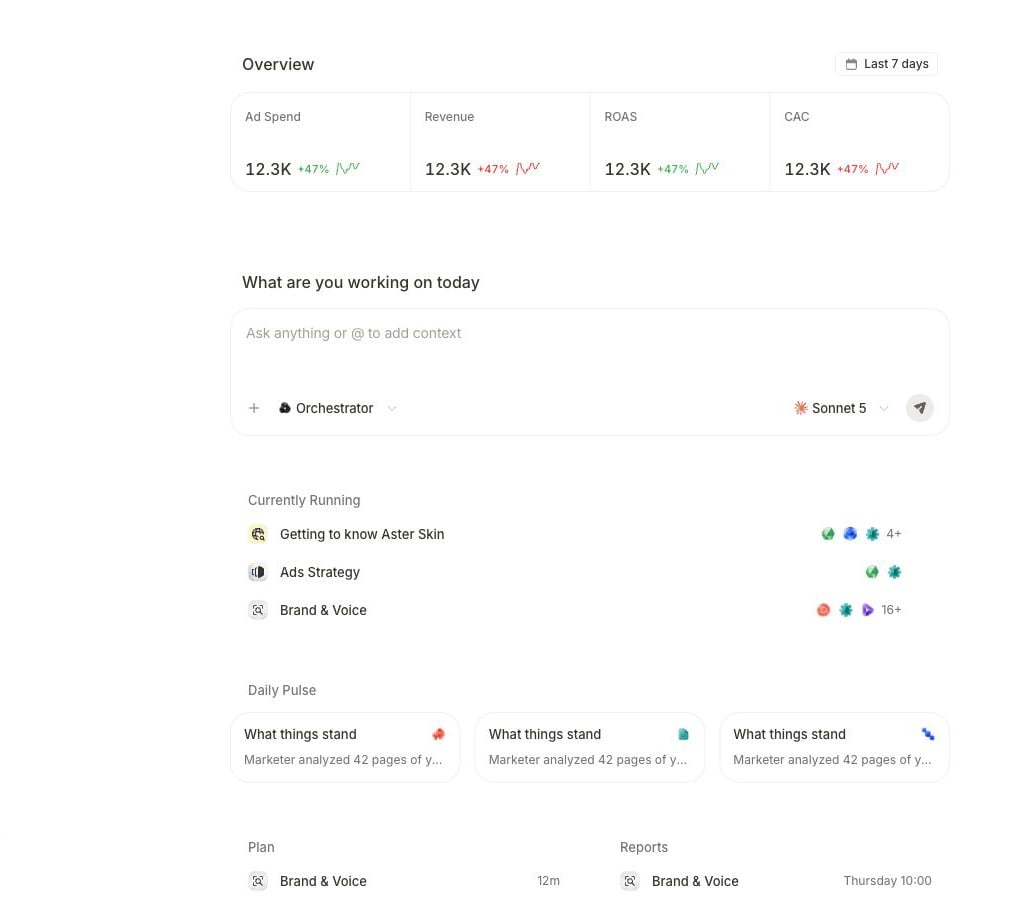
1. Open [Home](https://app.marketer.com/dashboard).
2. Confirm the workspace name in the upper-left selector.
3. Check the date range above **Overview** if you plan to refer to a metric visible on Home.
4. Select the composer labeled **Ask anything or @ to add context**.
The workspace controls which connected accounts, campaigns, products, briefs, creatives, Knowledge, Skills, and prior conversations the agent can use. Switching workspaces changes that scope.
## Attach the exact record
Select **+** on Home. In an existing conversation, select **+**, then **Add context**. The picker groups current workspace records under:
* **All**
* **Campaigns**
* **Briefs**
* **Creatives**
* **Products**
Choose the record that should define the task. It appears as an attachment in the composer before you send.
### Choose the attachment path
| Starting point | Use | What gets attached |
| ----------------------------------- | ------------------------------------------------------------------ | -------------------------------------------------------------------------- |
| You know the record | **+** on Home, or **+ → Add context** in a conversation | A campaign, brief, creative, or product selected from the workspace picker |
| You are already viewing it | **Pick from page** when offered | The exact tagged item on the current product page |
| The evidence is a document or image | **Upload files** on Home, or **+ → Attach file** in a conversation | The selected file, alongside any workspace records |
Attach the smallest set that uniquely establishes scope. The correct campaign plus a clear period is stronger context than every recent campaign with no decision attached.
The attachment identifies the record; it does not supply every analytical choice. State the provider, account, date range, attribution view, currency, or comparison you need in the request.
## Build the first turn
Write the request in this order so each part can be checked later:
1. **Outcome:** what decision or artifact should exist at the end.
2. **Scope:** the attached record, provider, account, channel, or audience.
3. **Evidence:** the sources and metrics the answer must use.
4. **Window:** exact dates or complete-period logic.
5. **Constraints:** facts, guardrails, exclusions, and permitted actions.
6. **Completion criteria:** what a reviewer must be able to see.
For example:
```text theme={null}
Using the attached prospecting campaign, compare the last 7 complete days
with the previous 7 in Meta Ads. Show spend, purchases, CPA, and ROAS, and
identify the largest material change. Name the account, dates, timezone, and
attribution view. Separate measured facts from hypotheses and recommend one
test. Analyze only; do not edit or launch anything.
```
This request tells Marketer what to calculate, which record and source to use, how to frame time, how to distinguish evidence from interpretation, and where to stop.
## Choose Auto or a specialist
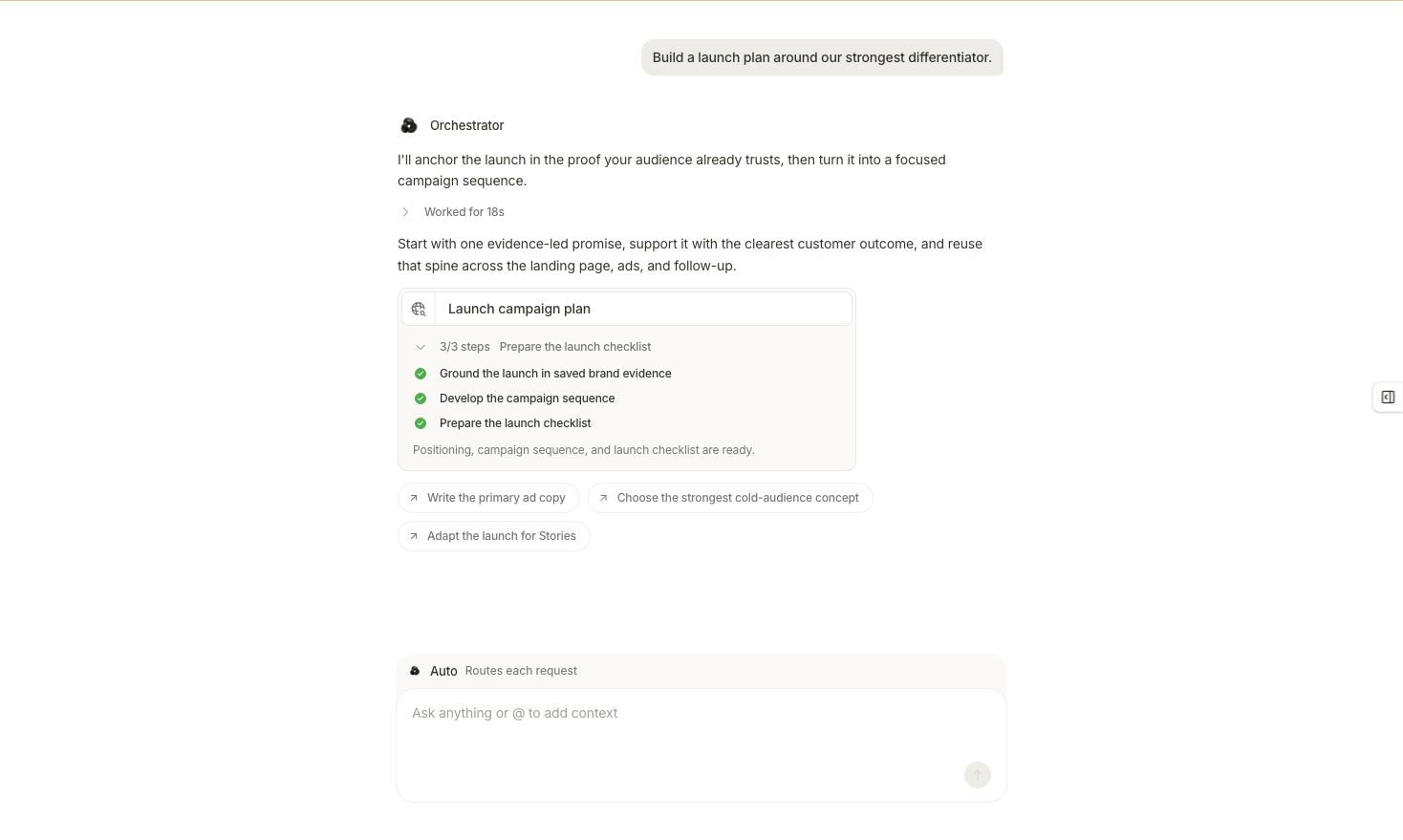
On Home, automatic routing appears as **Orchestrator**. Open the selector to see **Auto**, described as **Routes each request**. Keep this route when you want the Marketing Agent to choose the appropriate perspective for each turn.
If the menu shows a specialist whose perspective you want to keep, select that specialist before sending. The specialist remains visible in the composer for that conversation. Return to **Auto** when you want the Marketing Agent to route the next request again.
Choosing a specialist changes the perspective applied to the conversation. It does not by itself start a longer task or grant permission to change a connected account.
## Read the first response state
After you send, the conversation can take one of four paths.
### Direct answer
The agent answers in the thread without creating longer work. Check the source, dates, scope, and assumptions in the answer. Ask a follow-up in the same thread when it depends on the same attachments and decisions.
### Clarifying question
Marketer asks for a missing source, record, constraint, or decision. Answer in the current thread so the original context stays attached. If the missing input changes the objective substantially, start a new conversation instead.
### Proposed agent or pipeline run
Marketer shows the work it wants to perform before starting the longer run.
Review the proposal against your original request:
* Are the required context-gathering steps present?
* Does the plan produce the requested artifact?
* Does it add a write or generation step you did not request?
* Are important review points or constraints missing?
Then use the controls on that proposal. Current variants include **Cancel**, **Edit**, and **Accept & Run**; **Cancel**, **Edit**, and **Approve & Run**; or **Cancel**, **Edit brief**, and **Run it**. The edit branch returns the plan for revision when the goal is right but the execution plan is not.
### Waiting for input or approval
A run that already started can pause in **Waiting**. Open its detail to see whether it needs a conversational answer or a recorded decision. Answer questions in the thread; handle approval items through **Awaiting action** when that is where the interface routes them.
## Continue without losing the boundary
Keep the current conversation when the next turn relies on the same record, definitions, or decision. Use follow-ups that name the delta from the prior result:
```text theme={null}
Keep the same campaign, dates, source, and read-only boundary. Recalculate
the CPA change, show the previous and current numerator and denominator,
and flag whether either period is partial.
```
Start a new conversation when you change any of these materially:
* The objective or deliverable
* The workspace area or provider account
* The authority boundary
* The source-of-truth record
* The intended reviewer or handoff
This prevents old attachments or constraints from silently shaping unrelated work.
## Review the result in context
When the response or task completes:
1. Compare the output with the completion criteria in the first turn.
2. Confirm that attached records still represent the intended scope.
3. Identify the source, account, date range, timezone, currency, attribution view, and freshness behind each decision-driving figure.
4. Separate observed facts, interpretations, generated artifacts, and proposed actions.
5. Follow output links to the owning surface instead of relying on a chat summary alone.
6. If an action is proposed, preserve it as a separate review decision.
## Start in the right workspace
1. Open [Home](https://app.marketer.com/dashboard).
2. Confirm the workspace name in the upper-left selector.
3. Check the date range above **Overview** if you plan to refer to a metric visible on Home.
4. Select the composer labeled **Ask anything or @ to add context**.
The workspace controls which connected accounts, campaigns, products, briefs, creatives, Knowledge, Skills, and prior conversations the agent can use. Switching workspaces changes that scope.
## Attach the exact record
Select **+** on Home. In an existing conversation, select **+**, then **Add context**. The picker groups current workspace records under:
* **All**
* **Campaigns**
* **Briefs**
* **Creatives**
* **Products**
Choose the record that should define the task. It appears as an attachment in the composer before you send.
### Choose the attachment path
| Starting point | Use | What gets attached |
| ----------------------------------- | ------------------------------------------------------------------ | -------------------------------------------------------------------------- |
| You know the record | **+** on Home, or **+ → Add context** in a conversation | A campaign, brief, creative, or product selected from the workspace picker |
| You are already viewing it | **Pick from page** when offered | The exact tagged item on the current product page |
| The evidence is a document or image | **Upload files** on Home, or **+ → Attach file** in a conversation | The selected file, alongside any workspace records |
Attach the smallest set that uniquely establishes scope. The correct campaign plus a clear period is stronger context than every recent campaign with no decision attached.
The attachment identifies the record; it does not supply every analytical choice. State the provider, account, date range, attribution view, currency, or comparison you need in the request.
## Build the first turn
Write the request in this order so each part can be checked later:
1. **Outcome:** what decision or artifact should exist at the end.
2. **Scope:** the attached record, provider, account, channel, or audience.
3. **Evidence:** the sources and metrics the answer must use.
4. **Window:** exact dates or complete-period logic.
5. **Constraints:** facts, guardrails, exclusions, and permitted actions.
6. **Completion criteria:** what a reviewer must be able to see.
For example:
```text theme={null}
Using the attached prospecting campaign, compare the last 7 complete days
with the previous 7 in Meta Ads. Show spend, purchases, CPA, and ROAS, and
identify the largest material change. Name the account, dates, timezone, and
attribution view. Separate measured facts from hypotheses and recommend one
test. Analyze only; do not edit or launch anything.
```
This request tells Marketer what to calculate, which record and source to use, how to frame time, how to distinguish evidence from interpretation, and where to stop.
## Choose Auto or a specialist
On Home, automatic routing appears as **Orchestrator**. Open the selector to see **Auto**, described as **Routes each request**. Keep this route when you want the Marketing Agent to choose the appropriate perspective for each turn.
If the menu shows a specialist whose perspective you want to keep, select that specialist before sending. The specialist remains visible in the composer for that conversation. Return to **Auto** when you want the Marketing Agent to route the next request again.
Choosing a specialist changes the perspective applied to the conversation. It does not by itself start a longer task or grant permission to change a connected account.
## Read the first response state
After you send, the conversation can take one of four paths.
### Direct answer
The agent answers in the thread without creating longer work. Check the source, dates, scope, and assumptions in the answer. Ask a follow-up in the same thread when it depends on the same attachments and decisions.
### Clarifying question
Marketer asks for a missing source, record, constraint, or decision. Answer in the current thread so the original context stays attached. If the missing input changes the objective substantially, start a new conversation instead.
### Proposed agent or pipeline run
Marketer shows the work it wants to perform before starting the longer run.
Review the proposal against your original request:
* Are the required context-gathering steps present?
* Does the plan produce the requested artifact?
* Does it add a write or generation step you did not request?
* Are important review points or constraints missing?
Then use the controls on that proposal. Current variants include **Cancel**, **Edit**, and **Accept & Run**; **Cancel**, **Edit**, and **Approve & Run**; or **Cancel**, **Edit brief**, and **Run it**. The edit branch returns the plan for revision when the goal is right but the execution plan is not.
### Waiting for input or approval
A run that already started can pause in **Waiting**. Open its detail to see whether it needs a conversational answer or a recorded decision. Answer questions in the thread; handle approval items through **Awaiting action** when that is where the interface routes them.
## Continue without losing the boundary
Keep the current conversation when the next turn relies on the same record, definitions, or decision. Use follow-ups that name the delta from the prior result:
```text theme={null}
Keep the same campaign, dates, source, and read-only boundary. Recalculate
the CPA change, show the previous and current numerator and denominator,
and flag whether either period is partial.
```
Start a new conversation when you change any of these materially:
* The objective or deliverable
* The workspace area or provider account
* The authority boundary
* The source-of-truth record
* The intended reviewer or handoff
This prevents old attachments or constraints from silently shaping unrelated work.
## Review the result in context
When the response or task completes:
1. Compare the output with the completion criteria in the first turn.
2. Confirm that attached records still represent the intended scope.
3. Identify the source, account, date range, timezone, currency, attribution view, and freshness behind each decision-driving figure.
4. Separate observed facts, interpretations, generated artifacts, and proposed actions.
5. Follow output links to the owning surface instead of relying on a chat summary alone.
6. If an action is proposed, preserve it as a separate review decision.
 ## Recover from the wrong path
Do not continue from an answer grounded in the wrong object. Start a clean turn, attach the intended record, and ask Marketer to name it and its provider before analyzing.
Restate the decision, date window, source, metrics, and expected output. An attachment narrows identity; it does not define the full measurement frame.
Select **Edit** and remove unnecessary steps, reduce the output count, or separate research from generation. Approve only the plan you intend to run.
Open its task card or **Activity**. The initial response may acknowledge the request before the full output exists.
Start a new conversation and attach only the current records. State the new authority boundary and completion criteria in full.
## Next step
Track queued, working, waiting, completed, partial, failed, and canceled work.
See every context, routing, model, file, send, and stop control in place.
Move from a direct answer, question, proposal, or task to its correct next action.
Answer a waiting run or decide one proposed action.
Open Agents to see who owns each part of coordinated work.
Confirm the exact scope and effect before recording a decision.
Open **Chats and tasks**, then select **Chats**, when the next turn depends on earlier context.
## Related topics
- [Chats and tasks](/working-with-marketer/chats-and-tasks.md)
- [History and notifications](/working-with-marketer/history-and-notifications.md)
- [Navigation and Quick actions](/working-with-marketer/navigation-and-quick-actions.md)
- [Knowledge and Skills](/product-guides/knowledge-and-skills.md)
- [Task control and recovery](/working-with-marketer/task-control-and-recovery.md)
## Recover from the wrong path
Do not continue from an answer grounded in the wrong object. Start a clean turn, attach the intended record, and ask Marketer to name it and its provider before analyzing.
Restate the decision, date window, source, metrics, and expected output. An attachment narrows identity; it does not define the full measurement frame.
Select **Edit** and remove unnecessary steps, reduce the output count, or separate research from generation. Approve only the plan you intend to run.
Open its task card or **Activity**. The initial response may acknowledge the request before the full output exists.
Start a new conversation and attach only the current records. State the new authority boundary and completion criteria in full.
## Next step
Track queued, working, waiting, completed, partial, failed, and canceled work.
See every context, routing, model, file, send, and stop control in place.
Move from a direct answer, question, proposal, or task to its correct next action.
Answer a waiting run or decide one proposed action.
Open Agents to see who owns each part of coordinated work.
Confirm the exact scope and effect before recording a decision.
Open **Chats and tasks**, then select **Chats**, when the next turn depends on earlier context.
## Related topics
- [Chats and tasks](/working-with-marketer/chats-and-tasks.md)
- [History and notifications](/working-with-marketer/history-and-notifications.md)
- [Navigation and Quick actions](/working-with-marketer/navigation-and-quick-actions.md)
- [Knowledge and Skills](/product-guides/knowledge-and-skills.md)
- [Task control and recovery](/working-with-marketer/task-control-and-recovery.md)