> ## Documentation Index
> Fetch the complete documentation index at: https://docs.marketer.com/llms.txt
> Use this file to discover all available pages before exploring further.
# Workflows
> Configure repeated reporting, alerts, research, or guarded action and verify its persistent state, run, and delivery.
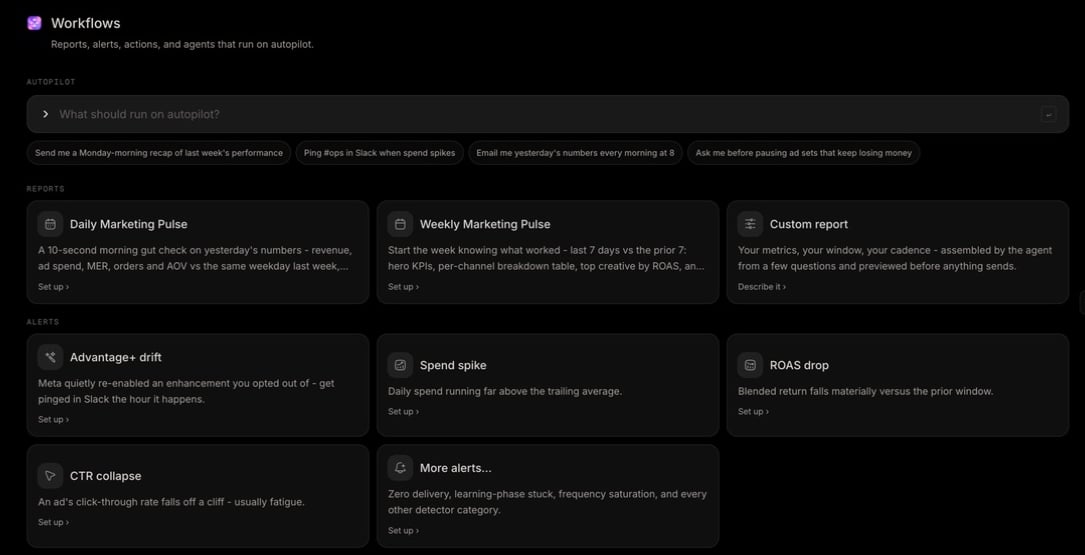
**Workflows** is the operating surface for supported work that should run again. It combines a natural-language builder, a library, and **Your workflows**, where persistent status, triggers, delivery, and runs remain visible.
Open [Workflows](https://app.marketer.com/dashboard/workflows). Use chat for a one-time request; use Workflows when the trigger and run record should persist.
## Before you begin
* Connect each provider the workflow needs and let its data sync.
* Connect Slack only for Slack delivery; email can operate independently where offered.
* Confirm workspace timezone, provider account, recipients, response owner, and role.
* Read displayed credits before activating recurring research or other metered work.
## Choose the workflow class
| Class | What repeats | Current boundary |
| ------------------- | ---------------------------------------------------- | -------------------------------------------------- |
| Report | Data read and Slack/email delivery on a schedule | Requires a supported ad connection |
| Alert | Detector event and notification | Current cards require Meta |
| Guarded action | Scheduled evaluation, approval, then provider action | **Metric guard** pauses eligible Meta objects only |
| Continuous research | External landscape scan and delivery | Displayed per-run credits apply |
| Agent | Specialist work with task state | Prerequisites vary by agent |
## Follow the operating lifecycle
Preset reports and alerts open focused setup. Custom reports, research, and guarded actions open the Marketing Agent with a structured request.
Confirm schedule or event, timezone, source scope, Slack channel and/or email recipients, and any approval boundary.
Compare report data with Analytics. For an acting workflow, inspect the exact provider, eligible list, effect, and human decision point.
Keep incomplete work **Draft** or **Paused**. Make it **Live** only after inputs, delivery, usage, and ownership are correct.
Use **Run now** when appropriate, open the run log, distinguish work from delivery, and verify any provider effect in Campaigns and the provider.
 ## Go deeper
Configure exact Schedule, Slack, and Email stations; understand provider gates; operate Your workflows; and verify run and delivery states.
## Important boundaries
* **Daily Marketing Pulse** and **Weekly Marketing Pulse** are presets; **Custom report** is agent-led.
* Current alert cards include **Advantage+ drift**, **Spend spike**, **ROAS drop**, **CTR collapse**, and **More alerts…**, and require Meta.
* **Metric guard** can pause a Meta campaign, ad set, or ad only after you approve the list. It never resumes delivery or changes budgets.
* **Alert auto-diagnosis** and **AI weekly brief** are **Coming soon**.
* **Run now** on an event alert can be a delivery test without a real provider event.
* Deleting stops the workflow immediately while keeping run history.
## Completion check
* Provider, account, trigger, metric, window, timezone, and destinations are correct.
* Preview or proposal reflects the intended data and effect.
* Live, Draft, or Paused state is intentional.
* The first scheduled or manual run reached a terminal result.
* Work, Slack delivery, and email delivery outcomes were inspected separately.
* A guarded provider effect was verified in Campaigns and the provider.
## If a workflow does not run
Confirm it is **Live**, the trigger occurred in the configured timezone, required sources are healthy, and delivery targets remain valid. Open run history for queueing, failure, **Needs you**, or **Stopped at approval**. Repair the existing configuration rather than creating a duplicate.
## Next step
Verify the data question before making it recur.
Review the exact scope and effect of a proposal.
## Related topics
- [Awaiting action](/working-with-marketer/awaiting-action.md)
- [Reports, alerts, guarded actions, and runs](/product-guides/workflows-reports-alerts-and-runs.md)
- [Questions and approvals](/working-with-marketer/questions-and-approvals.md)
- [Next steps](/get-started/next-steps.md)
- [Review results](/essential-guidelines/review-results.md)
## Go deeper
Configure exact Schedule, Slack, and Email stations; understand provider gates; operate Your workflows; and verify run and delivery states.
## Important boundaries
* **Daily Marketing Pulse** and **Weekly Marketing Pulse** are presets; **Custom report** is agent-led.
* Current alert cards include **Advantage+ drift**, **Spend spike**, **ROAS drop**, **CTR collapse**, and **More alerts…**, and require Meta.
* **Metric guard** can pause a Meta campaign, ad set, or ad only after you approve the list. It never resumes delivery or changes budgets.
* **Alert auto-diagnosis** and **AI weekly brief** are **Coming soon**.
* **Run now** on an event alert can be a delivery test without a real provider event.
* Deleting stops the workflow immediately while keeping run history.
## Completion check
* Provider, account, trigger, metric, window, timezone, and destinations are correct.
* Preview or proposal reflects the intended data and effect.
* Live, Draft, or Paused state is intentional.
* The first scheduled or manual run reached a terminal result.
* Work, Slack delivery, and email delivery outcomes were inspected separately.
* A guarded provider effect was verified in Campaigns and the provider.
## If a workflow does not run
Confirm it is **Live**, the trigger occurred in the configured timezone, required sources are healthy, and delivery targets remain valid. Open run history for queueing, failure, **Needs you**, or **Stopped at approval**. Repair the existing configuration rather than creating a duplicate.
## Next step
Verify the data question before making it recur.
Review the exact scope and effect of a proposal.
## Related topics
- [Awaiting action](/working-with-marketer/awaiting-action.md)
- [Reports, alerts, guarded actions, and runs](/product-guides/workflows-reports-alerts-and-runs.md)
- [Questions and approvals](/working-with-marketer/questions-and-approvals.md)
- [Next steps](/get-started/next-steps.md)
- [Review results](/essential-guidelines/review-results.md)