> ## Documentation Index
> Fetch the complete documentation index at: https://docs.marketer.com/llms.txt
> Use this file to discover all available pages before exploring further.
# Creatives
> Move from performance evidence and an approved brief through Studio production to a reusable asset and reviewed campaign handoff.
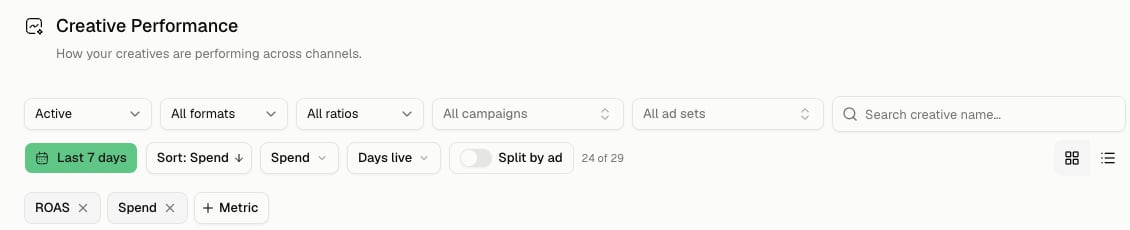
Marketer's creative lifecycle has four distinct surfaces: **Creatives** measures delivered Meta creative, **Briefs** defines what should be made, **Studio** generates and refines concepts, and **Creative Assets** holds reusable work.
Open [Creatives](https://app.marketer.com/dashboard/creatives) for performance, [Briefs](https://app.marketer.com/dashboard/briefs) for direction, [Studio](https://app.marketer.com/dashboard/studio/ads) for production, or [Creative Assets](https://app.marketer.com/dashboard/creative-library) for the library.
 ## Choose the right starting point
| Start with | When | Leave with |
| ------------------- | ---------------------------------------------------------------- | -------------------------------------------------- |
| **Creatives** | You need evidence from delivered Meta creative | A comparable finding and next test |
| **Briefs** | Audience, angle, offer, or production direction needs definition | Avatars and saved ad briefs ready for creative |
| **Studio** | Direction is approved and creation should begin | Persisted concepts and a reviewed version |
| **Creative Assets** | The file already exists or was saved/synced | Verified format, metadata, usage, and reuse choice |
## Follow the lifecycle
Compare compatible creative under one Meta date and filter frame. Treat a low-delivery outlier as a lead, not a winner.
Record objective, Avatar, angle, proof, offer, product, format, mandatory copy, exclusions, and acceptance criteria in a brief.
Confirm seeded product, angle, Avatar, references, format, and count in Studio. Review persisted versions for product accuracy, claims, brand fit, and placement.
Save the exact approved result to Creative Assets or add it to a campaign draft. Verify creative, copy, and destination before launch review.
## Go deeper
Filter delivered creative, split by ad, inspect breakdowns, and write a defensible learning.
Create Auto or Manual briefs, organize Avatars and ad briefs, generate, and launch into Meta.
Use exact composer context, generation states, refinements, versions, and destination actions.
Sync, upload, filter, label, inspect usage, and manage eligible linked-ad states.
## Important boundaries
* Creatives performance currently reflects synced Meta delivery; a Studio-only concept has no delivery evidence.
* An Avatar groups audience direction and can map ads into a Meta ad set during brief launch.
* A product attachment establishes identity but does not supply strategy or evidence.
* `@` references need an explicit role: factual source, visual inspiration, or **Avoid**.
* Creative Assets date controls scope metrics, not the existence of library files.
* **Use in campaign** opens a draft; it never counts as a launch.
## Completion check
* Workspace, product, destination, brand context, and audience are correct.
* Evidence and creative direction remain traceable to a date frame and approved source.
* Brief and Studio controls preserve objective, angle, proof, format, copy, and exclusions.
* The selected version passed product, claim, rights, legibility, and placement review.
* The result appears in Creative Assets or the intended campaign draft.
* Any campaign handoff remains subject to provider review, approval, and launch verification.
## If the creative flow breaks
Return to the owning surface. Fix strategy in Briefs, context or generation in Studio, saved-file identity in Creative Assets, delivery evidence in Creatives, and publication in Campaigns. Avoid regenerating or relaunching until the existing result's state is clear.
## Next step
Ground the work in an exact Shopify-backed record.
Carry approved creative through provider validation and launch.
## Related topics
- [Creative Assets](/product-guides/creatives-assets.md)
- [Creative performance](/product-guides/analytics-creative-performance.md)
- [Creative Briefs](/product-guides/creatives-briefs.md)
- [Produce a creative brief](/templates-use-cases/creative-brief.md)
- [Studio](/product-guides/creatives-studio.md)
## Choose the right starting point
| Start with | When | Leave with |
| ------------------- | ---------------------------------------------------------------- | -------------------------------------------------- |
| **Creatives** | You need evidence from delivered Meta creative | A comparable finding and next test |
| **Briefs** | Audience, angle, offer, or production direction needs definition | Avatars and saved ad briefs ready for creative |
| **Studio** | Direction is approved and creation should begin | Persisted concepts and a reviewed version |
| **Creative Assets** | The file already exists or was saved/synced | Verified format, metadata, usage, and reuse choice |
## Follow the lifecycle
Compare compatible creative under one Meta date and filter frame. Treat a low-delivery outlier as a lead, not a winner.
Record objective, Avatar, angle, proof, offer, product, format, mandatory copy, exclusions, and acceptance criteria in a brief.
Confirm seeded product, angle, Avatar, references, format, and count in Studio. Review persisted versions for product accuracy, claims, brand fit, and placement.
Save the exact approved result to Creative Assets or add it to a campaign draft. Verify creative, copy, and destination before launch review.
## Go deeper
Filter delivered creative, split by ad, inspect breakdowns, and write a defensible learning.
Create Auto or Manual briefs, organize Avatars and ad briefs, generate, and launch into Meta.
Use exact composer context, generation states, refinements, versions, and destination actions.
Sync, upload, filter, label, inspect usage, and manage eligible linked-ad states.
## Important boundaries
* Creatives performance currently reflects synced Meta delivery; a Studio-only concept has no delivery evidence.
* An Avatar groups audience direction and can map ads into a Meta ad set during brief launch.
* A product attachment establishes identity but does not supply strategy or evidence.
* `@` references need an explicit role: factual source, visual inspiration, or **Avoid**.
* Creative Assets date controls scope metrics, not the existence of library files.
* **Use in campaign** opens a draft; it never counts as a launch.
## Completion check
* Workspace, product, destination, brand context, and audience are correct.
* Evidence and creative direction remain traceable to a date frame and approved source.
* Brief and Studio controls preserve objective, angle, proof, format, copy, and exclusions.
* The selected version passed product, claim, rights, legibility, and placement review.
* The result appears in Creative Assets or the intended campaign draft.
* Any campaign handoff remains subject to provider review, approval, and launch verification.
## If the creative flow breaks
Return to the owning surface. Fix strategy in Briefs, context or generation in Studio, saved-file identity in Creative Assets, delivery evidence in Creatives, and publication in Campaigns. Avoid regenerating or relaunching until the existing result's state is clear.
## Next step
Ground the work in an exact Shopify-backed record.
Carry approved creative through provider validation and launch.
## Related topics
- [Creative Assets](/product-guides/creatives-assets.md)
- [Creative performance](/product-guides/analytics-creative-performance.md)
- [Creative Briefs](/product-guides/creatives-briefs.md)
- [Produce a creative brief](/templates-use-cases/creative-brief.md)
- [Studio](/product-guides/creatives-studio.md)