> ## Documentation Index
> Fetch the complete documentation index at: https://docs.marketer.com/llms.txt
> Use this file to discover all available pages before exploring further.
# Campaigns
> Inspect synced ad objects, build supported Meta or Google Ads campaigns, and follow every draft and launch to a verified provider state.
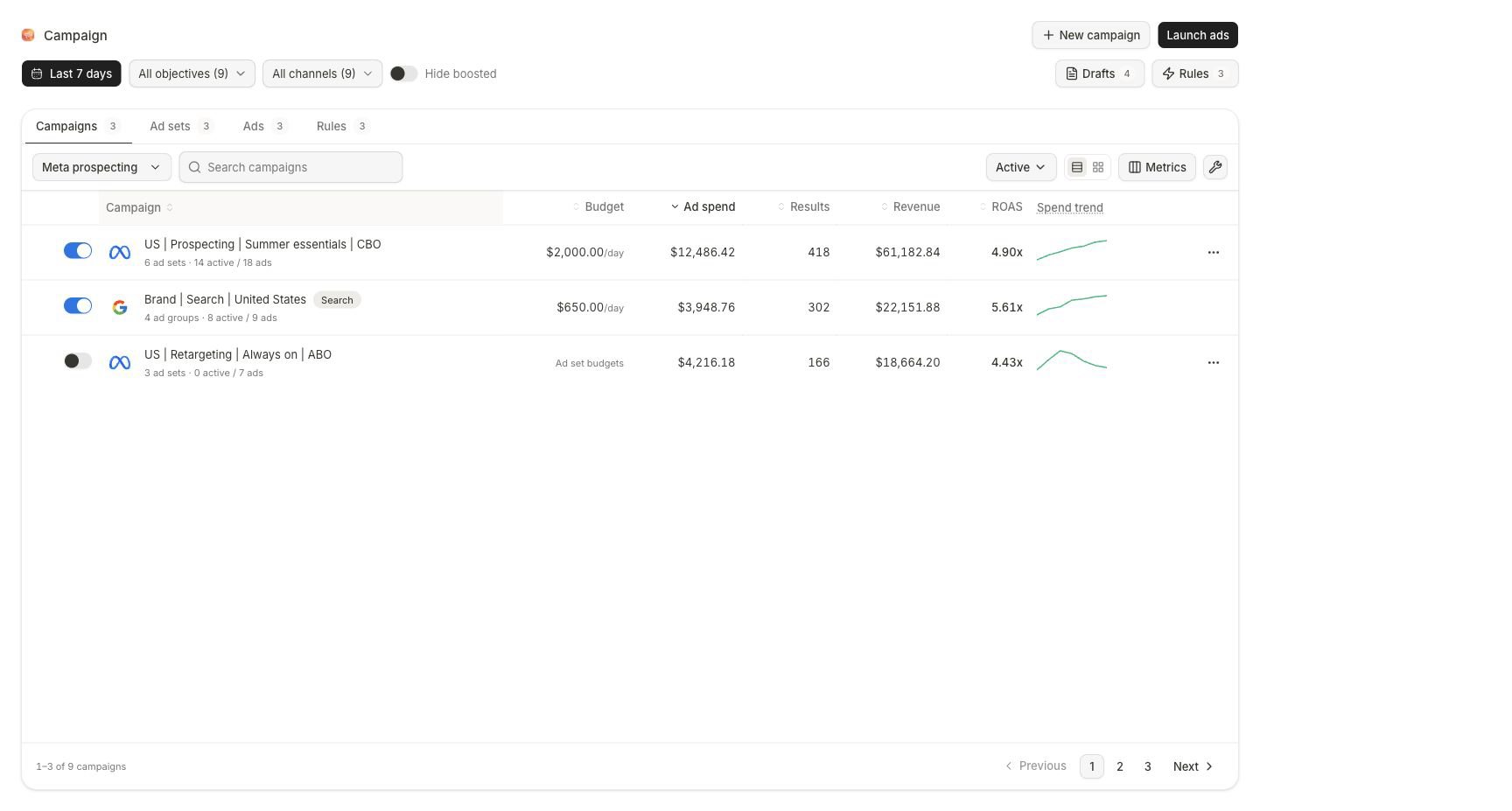
**Campaigns** separates three states that should never be confused: a synced provider object, an editable Marketer draft, and a launch that is publishing or complete.
Open [Campaigns](https://app.marketer.com/dashboard/campaigns) and confirm the active workspace, provider account, and date scope.
## Before you begin
* Connect the intended Meta or Google Ads account and let its first sync finish.
* Use a workspace role that permits the intended create or change action.
* Know the objective, product or destination, audience, budget boundary, creative, schedule, and approval owner.
* Do not substitute a different connected account when the intended provider resource is unavailable.
 ## Choose the lifecycle state
| State | Start with | Visible next state |
| ------------------------- | ----------------------------- | ------------------------------------------------------------------------------------------ |
| Existing provider object | Campaigns table | Campaign, child, or ad detail with eligible live controls |
| New Meta work | **New campaign → Meta** | Campaign setup, editable tree, Review, and launch progress |
| New Google work | **New campaign → Google Ads** | Objective, compatible type, builder, Review, and the chosen live or paused provider result |
| Saved or interrupted work | **Drafts** | **Review** for editing or **View progress** for publishing |
| Submitted work | **Launch ads** | Per-object terminal success, partial, or failed result |
## Use the table as scope, not explanation
Choose **All view**, then set date, objective, channel, status, search, and the intended campaign, child, or ad level.
Confirm provider, account, object grain, name, and parent-child relationship before reading metrics or using a control.
Read spend and the primary result, then open the campaign, child, or ad. Move to Analytics for cross-channel or attribution-aware diagnosis.
Record the old and proposed state before an external-account action. Confirm the outcome in Campaigns and the provider.
## Go deeper
Use object levels, Meta live controls, provider locks, and safe bulk actions.
Configure CBO/ABO ownership, ad sets, ads, review, and provider verification.
Choose a compatible objective and type, complete the builder, and verify the intended live or paused result.
Resume the correct record and recover from partial publication without duplicates.
## Important boundaries
* Changing the object-level tab changes the grain of every row.
* A saved view stores scope, not a metric snapshot or conclusion.
* Meta campaign objectives are immutable after creation, and some live fields lock after publication or delivery.
* Google shows only campaign types compatible with the selected objective. Native Video campaigns are created in Google Ads; **Demand Gen** is Marketer's API-supported YouTube route.
* Google review exposes **Publish live immediately**. The final action states **Approve & Create (LIVE)** or **Approve & Create (PAUSED)**; LIVE can start spending, so confirm the displayed target status instead of assuming a safe default.
* A Marketer success message is not final proof that every provider object succeeded.
## Completion check
* Workspace, provider, account, currency, and object hierarchy are correct.
* Objective, audience, conversion, budget owner and amount, creative, destination, and schedule match the plan.
* Review has no unresolved blocker.
* Any required proposal was decided against the exact object and effect.
* Every expected launch object reached a terminal state.
* Campaigns and the provider show the intended post-launch status.
## If a campaign is missing or stuck
Choose **All view**, restore the correct level, clear search and filters, include the provider status, and inspect the source sync. For a submitted launch, open **View progress** before retrying. When some provider objects already exist, inventory them and repair only the failed part.
## Next step
Establish the evidence before changing delivery.
Confirm old state, new state, scope, budget, and risk.
## Related topics
- [Build a Meta campaign](/product-guides/campaigns-meta-build.md)
- [Inspect and manage campaigns](/product-guides/campaigns-inspect-and-manage.md)
- [Build a Google Ads campaign](/product-guides/campaigns-google-build.md)
- [Prepare a campaign launch safely](/templates-use-cases/safe-campaign-launch.md)
- [Guardrails and autonomy](/workspace-admin/guardrails-and-autonomy.md)
## Choose the lifecycle state
| State | Start with | Visible next state |
| ------------------------- | ----------------------------- | ------------------------------------------------------------------------------------------ |
| Existing provider object | Campaigns table | Campaign, child, or ad detail with eligible live controls |
| New Meta work | **New campaign → Meta** | Campaign setup, editable tree, Review, and launch progress |
| New Google work | **New campaign → Google Ads** | Objective, compatible type, builder, Review, and the chosen live or paused provider result |
| Saved or interrupted work | **Drafts** | **Review** for editing or **View progress** for publishing |
| Submitted work | **Launch ads** | Per-object terminal success, partial, or failed result |
## Use the table as scope, not explanation
Choose **All view**, then set date, objective, channel, status, search, and the intended campaign, child, or ad level.
Confirm provider, account, object grain, name, and parent-child relationship before reading metrics or using a control.
Read spend and the primary result, then open the campaign, child, or ad. Move to Analytics for cross-channel or attribution-aware diagnosis.
Record the old and proposed state before an external-account action. Confirm the outcome in Campaigns and the provider.
## Go deeper
Use object levels, Meta live controls, provider locks, and safe bulk actions.
Configure CBO/ABO ownership, ad sets, ads, review, and provider verification.
Choose a compatible objective and type, complete the builder, and verify the intended live or paused result.
Resume the correct record and recover from partial publication without duplicates.
## Important boundaries
* Changing the object-level tab changes the grain of every row.
* A saved view stores scope, not a metric snapshot or conclusion.
* Meta campaign objectives are immutable after creation, and some live fields lock after publication or delivery.
* Google shows only campaign types compatible with the selected objective. Native Video campaigns are created in Google Ads; **Demand Gen** is Marketer's API-supported YouTube route.
* Google review exposes **Publish live immediately**. The final action states **Approve & Create (LIVE)** or **Approve & Create (PAUSED)**; LIVE can start spending, so confirm the displayed target status instead of assuming a safe default.
* A Marketer success message is not final proof that every provider object succeeded.
## Completion check
* Workspace, provider, account, currency, and object hierarchy are correct.
* Objective, audience, conversion, budget owner and amount, creative, destination, and schedule match the plan.
* Review has no unresolved blocker.
* Any required proposal was decided against the exact object and effect.
* Every expected launch object reached a terminal state.
* Campaigns and the provider show the intended post-launch status.
## If a campaign is missing or stuck
Choose **All view**, restore the correct level, clear search and filters, include the provider status, and inspect the source sync. For a submitted launch, open **View progress** before retrying. When some provider objects already exist, inventory them and repair only the failed part.
## Next step
Establish the evidence before changing delivery.
Confirm old state, new state, scope, budget, and risk.
## Related topics
- [Build a Meta campaign](/product-guides/campaigns-meta-build.md)
- [Inspect and manage campaigns](/product-guides/campaigns-inspect-and-manage.md)
- [Build a Google Ads campaign](/product-guides/campaigns-google-build.md)
- [Prepare a campaign launch safely](/templates-use-cases/safe-campaign-launch.md)
- [Guardrails and autonomy](/workspace-admin/guardrails-and-autonomy.md)