> ## Documentation Index
> Fetch the complete documentation index at: https://docs.marketer.com/llms.txt
> Use this file to discover all available pages before exploring further.
# Analytics
> Define a trustworthy measurement frame, diagnose performance, compare creative, and turn a reviewed view into recurring reporting.
**Analytics** combines connected marketing and commerce data into a reviewable performance surface. The core workflow is: define the frame, find the change, inspect the object that owns it, and preserve the evidence with the decision.
Open [Analytics](https://app.marketer.com/dashboard/analytics?view=performance\&channel=all) and confirm the active workspace.
## Before you begin
* Connect the source that owns the question: Meta, Google Ads, **Microsoft Ads (Beta)**, Google Analytics, Shopify, or **OpenAI Ads (Beta)**.
* Let the required date range finish syncing.
* Confirm the workspace reporting timezone and display currency.
* Use **Triple Whale (Beta)** only when you intentionally need its eligible attribution view; record its attribution model.
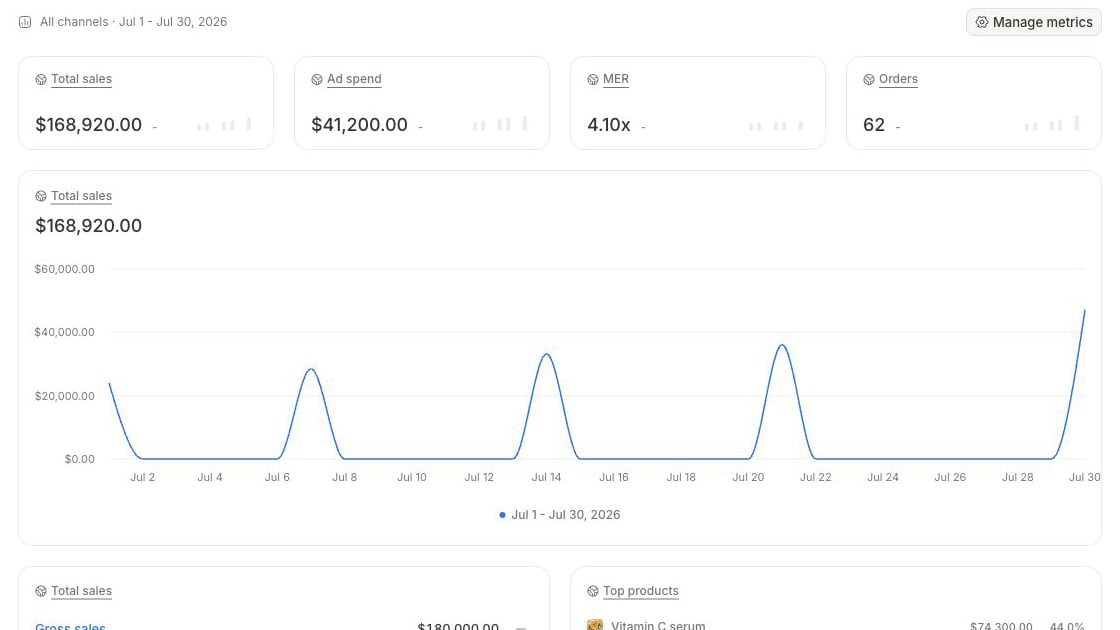 ## Choose the owning surface
| Question | Start in | Leave with |
| ------------------------------------------------ | --------------------------------------- | ---------------------------------------------------- |
| What changed across channels or commerce? | **Analytics → Performance** | A measured change and the leading breakdown |
| Which delivered creative is responsible? | **Creatives** | A like-for-like Meta creative comparison |
| Should this review recur? | **Reports** under Analytics | A configured report with a verified run and delivery |
| What file, campaign, or product owns the result? | Creative Assets, Campaigns, or Products | The exact source record and current state |
## Follow the measurement lifecycle
Set complete dates, **Daily**, **Weekly**, **Monthly**, or **Yearly** resolution, comparison, channel, included accounts, currency, and attribution. Use **Manage metrics → Visible metrics** to keep the relevant cards in view.
Start with the business result, read spend beside it, then locate when the change began. Do not infer cause from one correlated chart.
Move through the available campaign, search, landing-page, product, country, device, or other breakdown, then open the owning object.
Separate observed fact, hypothesis, and next check. Save a reusable custom view or report only after the frame is correct.
## Go deeper
Use exact source, account, date, comparison, block, measure, breakdown, and saved-view controls.
Filter Meta-delivered creative, split by ad, inspect breakdowns, and carry evidence into a brief.
## Important boundaries
* A syncing placeholder, withheld card, or missing value is not zero.
* **All channels** is complete only for the accounts and sources shown by **Accounts**.
* Switching to **Triple Whale (Beta)** creates a new attribution frame.
* The custom-view builder can support fewer channels than the main Analytics control.
* The current creative-performance surface is [Creatives](https://app.marketer.com/dashboard/creatives).
* A successful report data run and successful Slack/email delivery are separate outcomes.
## Completion check
* Workspace, account, complete dates, timezone, currency, channel, resolution, comparison, and attribution are recorded.
* Every decision-driving source has usable coverage or an explicit limitation.
* Outcome and spend were read before ratios and breakdowns.
* The campaign, creative, product, or integration that owns the result was verified.
* Fact, hypothesis, and next action remain distinct.
* Any saved view or report reproduces the intended frame.
## If the result looks wrong
Reset to a recent complete window, confirm **Accounts**, clear filters, and align provider, timezone, currency, attribution, conversion definition, and object grain. Open Integrations when a source remains syncing or disconnected. Preserve both frames when a provider discrepancy remains rather than forcing the values to match.
## Next step
Verify the provider object behind the measured change.
Turn a reviewed frame into a report with a verified run.
## Related topics
- [Google Analytics 4](/integrations/google-analytics-4.md)
- [Account overview](/workspace-admin/account-overview.md)
- [Performance and custom views](/product-guides/analytics-performance-and-views.md)
- [Conversion metrics](/workspace-admin/conversion-metrics.md)
- [Troubleshoot integrations](/integrations/troubleshooting.md)
## Choose the owning surface
| Question | Start in | Leave with |
| ------------------------------------------------ | --------------------------------------- | ---------------------------------------------------- |
| What changed across channels or commerce? | **Analytics → Performance** | A measured change and the leading breakdown |
| Which delivered creative is responsible? | **Creatives** | A like-for-like Meta creative comparison |
| Should this review recur? | **Reports** under Analytics | A configured report with a verified run and delivery |
| What file, campaign, or product owns the result? | Creative Assets, Campaigns, or Products | The exact source record and current state |
## Follow the measurement lifecycle
Set complete dates, **Daily**, **Weekly**, **Monthly**, or **Yearly** resolution, comparison, channel, included accounts, currency, and attribution. Use **Manage metrics → Visible metrics** to keep the relevant cards in view.
Start with the business result, read spend beside it, then locate when the change began. Do not infer cause from one correlated chart.
Move through the available campaign, search, landing-page, product, country, device, or other breakdown, then open the owning object.
Separate observed fact, hypothesis, and next check. Save a reusable custom view or report only after the frame is correct.
## Go deeper
Use exact source, account, date, comparison, block, measure, breakdown, and saved-view controls.
Filter Meta-delivered creative, split by ad, inspect breakdowns, and carry evidence into a brief.
## Important boundaries
* A syncing placeholder, withheld card, or missing value is not zero.
* **All channels** is complete only for the accounts and sources shown by **Accounts**.
* Switching to **Triple Whale (Beta)** creates a new attribution frame.
* The custom-view builder can support fewer channels than the main Analytics control.
* The current creative-performance surface is [Creatives](https://app.marketer.com/dashboard/creatives).
* A successful report data run and successful Slack/email delivery are separate outcomes.
## Completion check
* Workspace, account, complete dates, timezone, currency, channel, resolution, comparison, and attribution are recorded.
* Every decision-driving source has usable coverage or an explicit limitation.
* Outcome and spend were read before ratios and breakdowns.
* The campaign, creative, product, or integration that owns the result was verified.
* Fact, hypothesis, and next action remain distinct.
* Any saved view or report reproduces the intended frame.
## If the result looks wrong
Reset to a recent complete window, confirm **Accounts**, clear filters, and align provider, timezone, currency, attribution, conversion definition, and object grain. Open Integrations when a source remains syncing or disconnected. Preserve both frames when a provider discrepancy remains rather than forcing the values to match.
## Next step
Verify the provider object behind the measured change.
Turn a reviewed frame into a report with a verified run.
## Related topics
- [Google Analytics 4](/integrations/google-analytics-4.md)
- [Account overview](/workspace-admin/account-overview.md)
- [Performance and custom views](/product-guides/analytics-performance-and-views.md)
- [Conversion metrics](/workspace-admin/conversion-metrics.md)
- [Troubleshoot integrations](/integrations/troubleshooting.md)