> ## Documentation Index
> Fetch the complete documentation index at: https://docs.marketer.com/llms.txt
> Use this file to discover all available pages before exploring further.
# Integrations
> Connect the advertising, commerce, analytics, and messaging systems that give Marketer its working context.
Integrations bring source data and provider actions into the **active workspace**. A connection in one workspace does not automatically appear in another.
Owners, Admins, and Members can manage integrations. Viewers can inspect connection, selection, and freshness state but cannot connect, reconnect, change selections, sync, or disconnect.
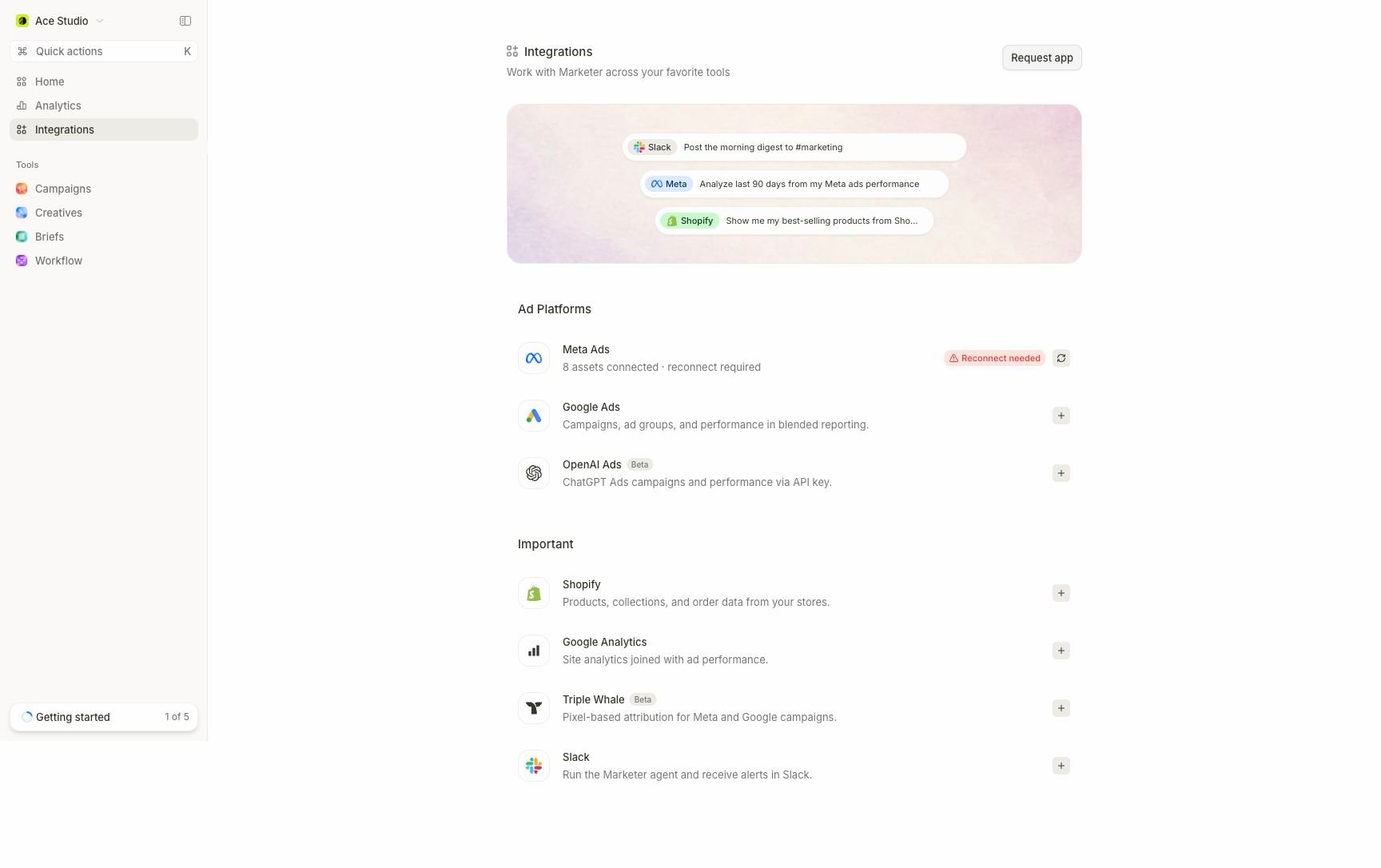 ## Choose the source you need
| Integration | Workspace context it adds | Important boundary |
| ------------------------------------------------------ | --------------------------------------------------------------------------- | ----------------------------------------------------------------- |
| [Meta Ads](/integrations/meta-ads) | Campaigns, creatives, audiences, pixels, catalogs, and selected Meta assets | Publishing needs a granted Facebook Page |
| [Google Ads](/integrations/google-ads) | Selected leaf accounts, campaigns, ad groups, ads, and performance | Manager accounts expose children but are not reporting units |
| [Shopify](/integrations/shopify) | Products, collections, orders, and revenue from one or more stores | Each store can be included in or excluded from the revenue rollup |
| [Google Analytics 4](/integrations/google-analytics-4) | Read-only sessions, channels, campaigns, and landing pages | GA4 attribution is separate from ad-platform attribution |
| [Slack](/integrations/slack) | Agent conversations, approvals, progress, and routed workspace alerts | Installation and alert routing are separate setup steps |
| [Beta integrations](/integrations/beta) | Microsoft Ads (Beta), OpenAI Ads (Beta), and Triple Whale (Beta) | Beta behavior and coverage can evolve faster |
## Read the connection state
The directory and provider page separate authorization, resource selection, and data sync. Resolve them in that order.
| State | What it means | Next action |
| --------------------------------------------------------------- | ------------------------------------------------------------------------ | ------------------------------------------------------ |
| **Checking status** | Marketer is verifying the provider | Wait for the check to finish |
| **Status unavailable** | The latest check failed; this is not proof of disconnection | Refresh before changing anything |
| **Disconnected** | No active authorization or credential is available | Select **Connect** |
| **Reconnect needed** | The provider rejected or revoked the saved authorization | Select **Reconnect** and complete provider consent |
| **Finish setup**, **Choose accounts**, or **Choose properties** | Authorization succeeded, but required resources are not selected | Reopen setup and save a valid selection |
| **Refresh access** | Authorization exists, but no selectable provider resources were resolved | Fix provider access, then refresh the available roster |
| **Syncing** | Selected resources are importing | Wait; use coverage rather than the badge alone |
| **Sync failed** | Authorization may still be healthy, but the import did not finish | Use **Retry sync** or **Resync** |
| **Connected** | Authorization and required setup are present | Confirm selection, last sync, and coverage |
**Connected** confirms authorization and setup. It does not mean every historical period has finished importing or that the provider considers today's metrics final.
## Connect and verify a source
Check the workspace name in the top-left switcher. Provider resources should belong to this workspace.
Open **Integrations**, choose the provider, and use the displayed connection action. Review the provider's consent screen or credential request.
Choose only the accounts, stores, properties, or assets that should contribute here. Authorization alone is not a saved reporting selection.
Watch the provider's sync status, last-sync time, and coverage. Historical data can continue importing after recent data becomes usable.
Ask one narrow, read-only question for a named resource and completed date range. Compare the result with the provider before expanding the workflow.
## Reconnect, reselect, or resync?
* **Reconnect** repairs provider authorization. It should not be your first response to an ordinary sync failure.
* **Manage accounts**, **Manage properties**, or the provider's asset dialog changes what enters the workspace.
* **Refresh account access** or **Refresh property access** reloads the roster the current authorization can see.
* **Resync** refreshes data only after authorization and selection are healthy.
* **Disconnect** removes the provider from the workspace. Review reports, audiences, alerts, and workflows that depend on it first.
If a state is ambiguous, follow [Troubleshoot integrations](/integrations/troubleshooting) rather than repeatedly reconnecting.
## Currency and attribution
Blended reporting uses the workspace reporting currency. A provider account can retain a different source currency, so confirm both before reconciling raw and blended values.
Attribution also remains source-specific. Meta Ads, Google Ads, GA4, Shopify, and Triple Whale (Beta) can report different totals for valid methodological reasons. Name the source and date range in any decision record.
## Next step
Open the provider guide you need, complete one verified sync, then review [Guardrails and autonomy](/workspace-admin/guardrails-and-autonomy) before enabling spend-affecting work.
## Related topics
- [Beta integrations](/integrations/beta.md)
- [Troubleshoot integrations](/integrations/troubleshooting.md)
- [Google Analytics 4](/integrations/google-analytics-4.md)
- [Shopify](/integrations/shopify.md)
- [Google Ads](/integrations/google-ads.md)
## Choose the source you need
| Integration | Workspace context it adds | Important boundary |
| ------------------------------------------------------ | --------------------------------------------------------------------------- | ----------------------------------------------------------------- |
| [Meta Ads](/integrations/meta-ads) | Campaigns, creatives, audiences, pixels, catalogs, and selected Meta assets | Publishing needs a granted Facebook Page |
| [Google Ads](/integrations/google-ads) | Selected leaf accounts, campaigns, ad groups, ads, and performance | Manager accounts expose children but are not reporting units |
| [Shopify](/integrations/shopify) | Products, collections, orders, and revenue from one or more stores | Each store can be included in or excluded from the revenue rollup |
| [Google Analytics 4](/integrations/google-analytics-4) | Read-only sessions, channels, campaigns, and landing pages | GA4 attribution is separate from ad-platform attribution |
| [Slack](/integrations/slack) | Agent conversations, approvals, progress, and routed workspace alerts | Installation and alert routing are separate setup steps |
| [Beta integrations](/integrations/beta) | Microsoft Ads (Beta), OpenAI Ads (Beta), and Triple Whale (Beta) | Beta behavior and coverage can evolve faster |
## Read the connection state
The directory and provider page separate authorization, resource selection, and data sync. Resolve them in that order.
| State | What it means | Next action |
| --------------------------------------------------------------- | ------------------------------------------------------------------------ | ------------------------------------------------------ |
| **Checking status** | Marketer is verifying the provider | Wait for the check to finish |
| **Status unavailable** | The latest check failed; this is not proof of disconnection | Refresh before changing anything |
| **Disconnected** | No active authorization or credential is available | Select **Connect** |
| **Reconnect needed** | The provider rejected or revoked the saved authorization | Select **Reconnect** and complete provider consent |
| **Finish setup**, **Choose accounts**, or **Choose properties** | Authorization succeeded, but required resources are not selected | Reopen setup and save a valid selection |
| **Refresh access** | Authorization exists, but no selectable provider resources were resolved | Fix provider access, then refresh the available roster |
| **Syncing** | Selected resources are importing | Wait; use coverage rather than the badge alone |
| **Sync failed** | Authorization may still be healthy, but the import did not finish | Use **Retry sync** or **Resync** |
| **Connected** | Authorization and required setup are present | Confirm selection, last sync, and coverage |
**Connected** confirms authorization and setup. It does not mean every historical period has finished importing or that the provider considers today's metrics final.
## Connect and verify a source
Check the workspace name in the top-left switcher. Provider resources should belong to this workspace.
Open **Integrations**, choose the provider, and use the displayed connection action. Review the provider's consent screen or credential request.
Choose only the accounts, stores, properties, or assets that should contribute here. Authorization alone is not a saved reporting selection.
Watch the provider's sync status, last-sync time, and coverage. Historical data can continue importing after recent data becomes usable.
Ask one narrow, read-only question for a named resource and completed date range. Compare the result with the provider before expanding the workflow.
## Reconnect, reselect, or resync?
* **Reconnect** repairs provider authorization. It should not be your first response to an ordinary sync failure.
* **Manage accounts**, **Manage properties**, or the provider's asset dialog changes what enters the workspace.
* **Refresh account access** or **Refresh property access** reloads the roster the current authorization can see.
* **Resync** refreshes data only after authorization and selection are healthy.
* **Disconnect** removes the provider from the workspace. Review reports, audiences, alerts, and workflows that depend on it first.
If a state is ambiguous, follow [Troubleshoot integrations](/integrations/troubleshooting) rather than repeatedly reconnecting.
## Currency and attribution
Blended reporting uses the workspace reporting currency. A provider account can retain a different source currency, so confirm both before reconciling raw and blended values.
Attribution also remains source-specific. Meta Ads, Google Ads, GA4, Shopify, and Triple Whale (Beta) can report different totals for valid methodological reasons. Name the source and date range in any decision record.
## Next step
Open the provider guide you need, complete one verified sync, then review [Guardrails and autonomy](/workspace-admin/guardrails-and-autonomy) before enabling spend-affecting work.
## Related topics
- [Beta integrations](/integrations/beta.md)
- [Troubleshoot integrations](/integrations/troubleshooting.md)
- [Google Analytics 4](/integrations/google-analytics-4.md)
- [Shopify](/integrations/shopify.md)
- [Google Ads](/integrations/google-ads.md)