> ## Documentation Index
> Fetch the complete documentation index at: https://docs.marketer.com/llms.txt
> Use this file to discover all available pages before exploring further.
# Review your result
> Inspect a completed task, verify its evidence, and separate suggested follow-ups from approved or completed actions.
A completed task is ready for review, not automatically ready for a decision. Reopen the result, match it to the original request, verify the decision-driving evidence, and identify the exact action state before you continue.
## Open the completed state
Use the result link in the conversation or reopen the task from the workspace's conversation and task history. Confirm the task belongs to the intended workspace and request.
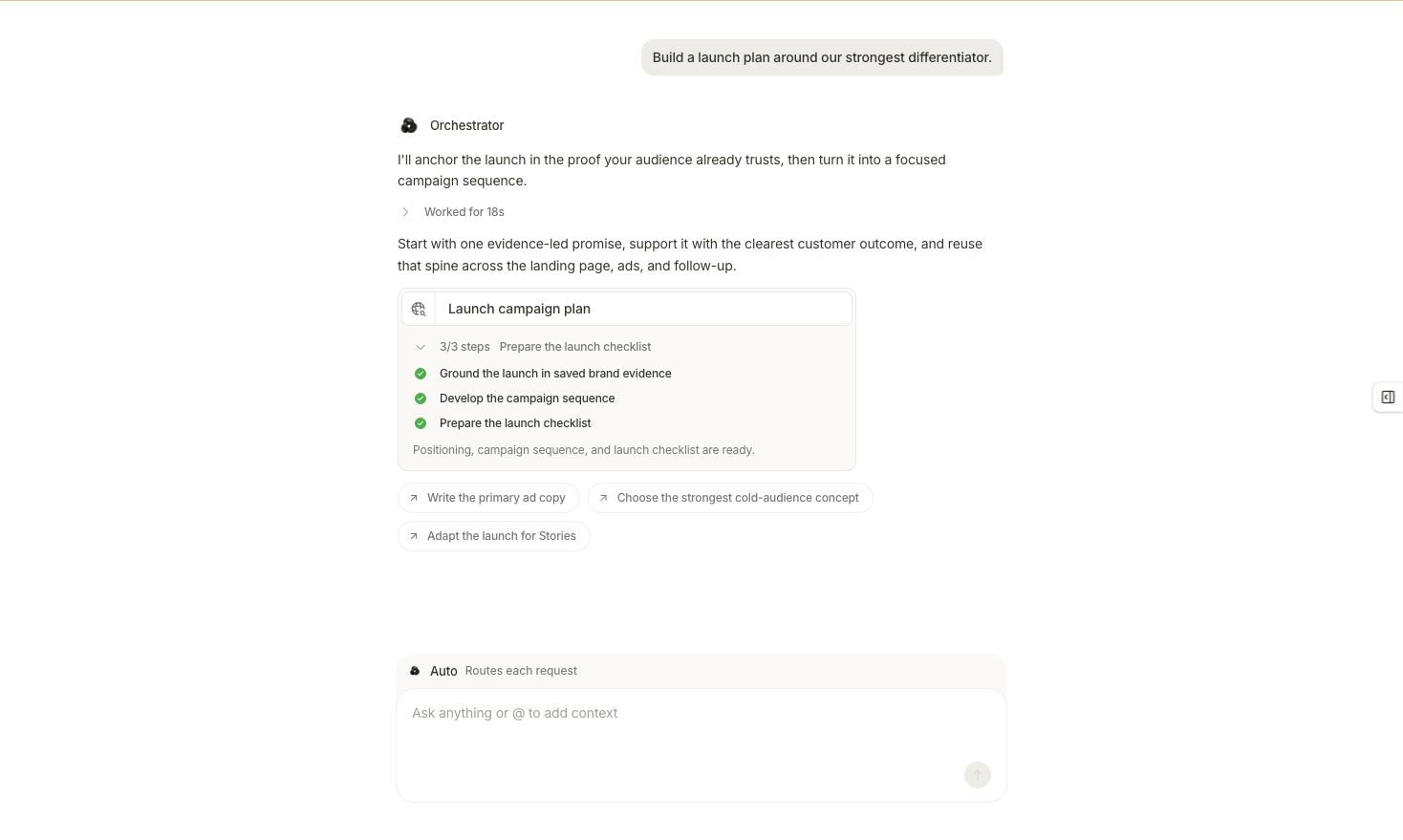 Read the screen in this order:
1. **Original request.** Confirm the outcome and authority boundary at the top of the conversation.
2. **Final answer.** Check that it answers the requested question rather than a nearby one.
3. **Task receipt.** Expand or inspect the completed steps when you need to understand what work ran.
4. **Produced artifact.** Open the report, brief, creative, campaign draft, or workflow in the product surface that owns it.
5. **Suggested follow-ups.** Treat these as new requests you can choose, not as work already completed.
If the task still shows an active or waiting step, it has not reached this state. Return to [Tasks and activity](/working-with-marketer/tasks-and-activity) and resolve the pending input or prerequisite.
## Run the evidence check
Review depth should match the consequence of the result. Use all five checks for any result that can influence budget, targeting, creative, reporting, or launch decisions.
### 1. Match the request
Compare the result with the requested outcome, source, scope, time window, output, and action boundary.
* An account-level request should not silently become a campaign-only answer.
* A read-only request should not be reported as a completed provider change.
* A requested artifact should exist in the surface that owns it, not only as a recommendation in chat.
### 2. Verify source and freshness
Identify which connected system supplied every decision-driving figure. Meta Ads, Google Ads, Shopify, GA4, and Triple Whale **(Beta)** can describe different parts of the customer journey; their numbers are not interchangeable.
Check the provider account, selected resource, latest available coverage, and any missing or partial dates. When the result and provider state disagree, open **Integrations** before relying on the number.
### 3. Verify time and scope
Confirm:
* Exact start and end dates
* Timezone used to define each day
* Complete versus partial periods
* Workspace and provider account
* Account, campaign, ad set or ad group, ad, product, or other entity level
* Filters, attribution source, attribution model, and currency when relevant
Equivalent-looking labels do not prove equivalent scope. Attach or open the exact workspace record when names are similar.
### 4. Recalculate the main claim
Ask for the inputs behind the conclusion. For a percentage change, verify the previous value, current value, and formula. For CPA or ROAS, confirm the numerator and denominator use the intended source and reporting definition.
Missing data is not zero. If a source is disconnected, still syncing, or incomplete for a date, treat the affected metric as unknown.
### 5. Identify the action state
Determine what exists now:
| State | What it proves | What it does not prove |
| -------------------------- | ---------------------------------------------------- | ------------------------------------------------------------------------------- |
| Analysis or recommendation | Marketer produced a view of the evidence | A campaign or setting changed |
| Draft or artifact | Marketer created work for review | The work was published or launched |
| Proposal | A specific plan is waiting for a decision | The proposed steps have run |
| Approved task | An authorized run may proceed under workspace policy | The external provider already reflects the intended result |
| Completed write | Marketer reports that an action finished | The owning product surface and provider state are correct until you verify them |
## Review the proposal branch
When the result leads to work that needs permission, inspect the proposal rather than approving from the summary alone.
Before you select the proposal's displayed run control, confirm:
* The intended workspace and connected provider
* Every object or destination the task can affect
* The evidence and date range that justify the work
* Budget, targeting, creative, or publishing consequences
* Guardrails and autonomy settings that apply
* Whether the result should remain a draft, become paused work, or go live
* Who is authorized to approve
Use **Edit** or **Edit brief** to correct missing or excessive scope. Use **Cancel** when the plan should not continue. The start control varies by proposal and can read **Accept & Run**, **Approve & Run**, or **Run it**. If you leave the conversation, unresolved decisions can be available in **Awaiting action**.
## Ask for an evidence pass
Use this in the same conversation before a material decision:
```text theme={null}
Audit this answer before I use it. List the source, provider account, exact
dates, timezone, freshness, scope, filters, attribution definition, and
currency for every decision-driving figure. Recalculate the main comparison,
identify missing data, separate facts from inferences, and state exactly what
has and has not been changed. Do not make any new changes.
```
## Resolve mismatches
| What you find | What to do next |
| ----------------------------------------- | ------------------------------------------------------------------------------------------------------------------------------ |
| The answer omits source, dates, or scope | Ask the evidence pass above; do not infer the missing field. |
| A requested metric is unavailable | Confirm the source supports it and the requested dates are covered; treat the value as unknown. |
| Another dashboard shows a different value | Align conversion definition, click versus order date, timezone, attribution model, currency, and filters. |
| The task finished but no artifact exists | Open the owning product area and confirm its filters. If the result only recommended an artifact, request creation explicitly. |
| A proposal is based on stale evidence | Leave it unresolved or dismiss it, refresh the analysis, and request a new proposal. |
| The interface reports a completed write | Verify the resulting state in **Campaigns**, **Creatives**, **Workflow**, or the relevant connected provider. |
## Close the review loop
A reviewed result has four outcomes recorded in the conversation or downstream work:
1. The fact or artifact you accept
2. The evidence window and source that support it
3. Any limitation or open question
4. The next action and whether it is only a suggestion, a draft, pending approval, or verified complete
Continue to [Next steps](/get-started/next-steps) when you can state all four without guessing. For the reusable review method, see [Review results](/essential-guidelines/review-results).
## Related topics
- [Run your first task](/get-started/first-task.md)
- [Review results](/essential-guidelines/review-results.md)
- [Answers, tasks, and proposals](/working-with-marketer/answers-tasks-and-proposals.md)
- [Chat and context](/working-with-marketer/chat-and-context.md)
- [Introduction to Marketer](/get-started/introduction.md)
Read the screen in this order:
1. **Original request.** Confirm the outcome and authority boundary at the top of the conversation.
2. **Final answer.** Check that it answers the requested question rather than a nearby one.
3. **Task receipt.** Expand or inspect the completed steps when you need to understand what work ran.
4. **Produced artifact.** Open the report, brief, creative, campaign draft, or workflow in the product surface that owns it.
5. **Suggested follow-ups.** Treat these as new requests you can choose, not as work already completed.
If the task still shows an active or waiting step, it has not reached this state. Return to [Tasks and activity](/working-with-marketer/tasks-and-activity) and resolve the pending input or prerequisite.
## Run the evidence check
Review depth should match the consequence of the result. Use all five checks for any result that can influence budget, targeting, creative, reporting, or launch decisions.
### 1. Match the request
Compare the result with the requested outcome, source, scope, time window, output, and action boundary.
* An account-level request should not silently become a campaign-only answer.
* A read-only request should not be reported as a completed provider change.
* A requested artifact should exist in the surface that owns it, not only as a recommendation in chat.
### 2. Verify source and freshness
Identify which connected system supplied every decision-driving figure. Meta Ads, Google Ads, Shopify, GA4, and Triple Whale **(Beta)** can describe different parts of the customer journey; their numbers are not interchangeable.
Check the provider account, selected resource, latest available coverage, and any missing or partial dates. When the result and provider state disagree, open **Integrations** before relying on the number.
### 3. Verify time and scope
Confirm:
* Exact start and end dates
* Timezone used to define each day
* Complete versus partial periods
* Workspace and provider account
* Account, campaign, ad set or ad group, ad, product, or other entity level
* Filters, attribution source, attribution model, and currency when relevant
Equivalent-looking labels do not prove equivalent scope. Attach or open the exact workspace record when names are similar.
### 4. Recalculate the main claim
Ask for the inputs behind the conclusion. For a percentage change, verify the previous value, current value, and formula. For CPA or ROAS, confirm the numerator and denominator use the intended source and reporting definition.
Missing data is not zero. If a source is disconnected, still syncing, or incomplete for a date, treat the affected metric as unknown.
### 5. Identify the action state
Determine what exists now:
| State | What it proves | What it does not prove |
| -------------------------- | ---------------------------------------------------- | ------------------------------------------------------------------------------- |
| Analysis or recommendation | Marketer produced a view of the evidence | A campaign or setting changed |
| Draft or artifact | Marketer created work for review | The work was published or launched |
| Proposal | A specific plan is waiting for a decision | The proposed steps have run |
| Approved task | An authorized run may proceed under workspace policy | The external provider already reflects the intended result |
| Completed write | Marketer reports that an action finished | The owning product surface and provider state are correct until you verify them |
## Review the proposal branch
When the result leads to work that needs permission, inspect the proposal rather than approving from the summary alone.
Before you select the proposal's displayed run control, confirm:
* The intended workspace and connected provider
* Every object or destination the task can affect
* The evidence and date range that justify the work
* Budget, targeting, creative, or publishing consequences
* Guardrails and autonomy settings that apply
* Whether the result should remain a draft, become paused work, or go live
* Who is authorized to approve
Use **Edit** or **Edit brief** to correct missing or excessive scope. Use **Cancel** when the plan should not continue. The start control varies by proposal and can read **Accept & Run**, **Approve & Run**, or **Run it**. If you leave the conversation, unresolved decisions can be available in **Awaiting action**.
## Ask for an evidence pass
Use this in the same conversation before a material decision:
```text theme={null}
Audit this answer before I use it. List the source, provider account, exact
dates, timezone, freshness, scope, filters, attribution definition, and
currency for every decision-driving figure. Recalculate the main comparison,
identify missing data, separate facts from inferences, and state exactly what
has and has not been changed. Do not make any new changes.
```
## Resolve mismatches
| What you find | What to do next |
| ----------------------------------------- | ------------------------------------------------------------------------------------------------------------------------------ |
| The answer omits source, dates, or scope | Ask the evidence pass above; do not infer the missing field. |
| A requested metric is unavailable | Confirm the source supports it and the requested dates are covered; treat the value as unknown. |
| Another dashboard shows a different value | Align conversion definition, click versus order date, timezone, attribution model, currency, and filters. |
| The task finished but no artifact exists | Open the owning product area and confirm its filters. If the result only recommended an artifact, request creation explicitly. |
| A proposal is based on stale evidence | Leave it unresolved or dismiss it, refresh the analysis, and request a new proposal. |
| The interface reports a completed write | Verify the resulting state in **Campaigns**, **Creatives**, **Workflow**, or the relevant connected provider. |
## Close the review loop
A reviewed result has four outcomes recorded in the conversation or downstream work:
1. The fact or artifact you accept
2. The evidence window and source that support it
3. Any limitation or open question
4. The next action and whether it is only a suggestion, a draft, pending approval, or verified complete
Continue to [Next steps](/get-started/next-steps) when you can state all four without guessing. For the reusable review method, see [Review results](/essential-guidelines/review-results).
## Related topics
- [Run your first task](/get-started/first-task.md)
- [Review results](/essential-guidelines/review-results.md)
- [Answers, tasks, and proposals](/working-with-marketer/answers-tasks-and-proposals.md)
- [Chat and context](/working-with-marketer/chat-and-context.md)
- [Introduction to Marketer](/get-started/introduction.md)