> ## Documentation Index
> Fetch the complete documentation index at: https://docs.marketer.com/llms.txt
> Use this file to discover all available pages before exploring further.
# Quickstart
> Enter the right workspace, connect one source, build a grounded launch plan, and verify the result.
This quickstart takes you through one complete flow: enter the correct workspace, connect one ads source, build a launch plan from approved evidence, and verify the result. The flow stops at planning; it does not create, edit, publish, pause, or launch anything.
## Before you begin
You need:
* Access to [Marketer](https://app.marketer.com)
* Permission to connect one Meta Ads or Google Ads account
* An approved product, offer, or positioning source for the workspace
If you received a workspace invitation, sign in with the invited email address. Join that workspace instead of creating a second workspace for the same company.
## 1. Enter the workspace
Use Google sign-in or enter your work email and complete email verification. The email path also asks you to finish your personal profile.
Accept the invited workspace when one is available. Otherwise, enter the company name and website, then confirm the country and reporting currency. A logo is optional.
Choose the role and use cases that match how you plan to work. Invite teammates or connect Slack if you are ready, or skip those choices and continue.
When Home opens, check the workspace name. Switch before continuing if it does not own the data and Knowledge you intend to use.
Onboarding does not include plan selection. Workspace billing, when applicable and available to your role, lives in **Settings → Plans & Billing**.
## 2. Connect one source
You can connect an account during the onboarding **Sync in data** step or later from **Integrations**.
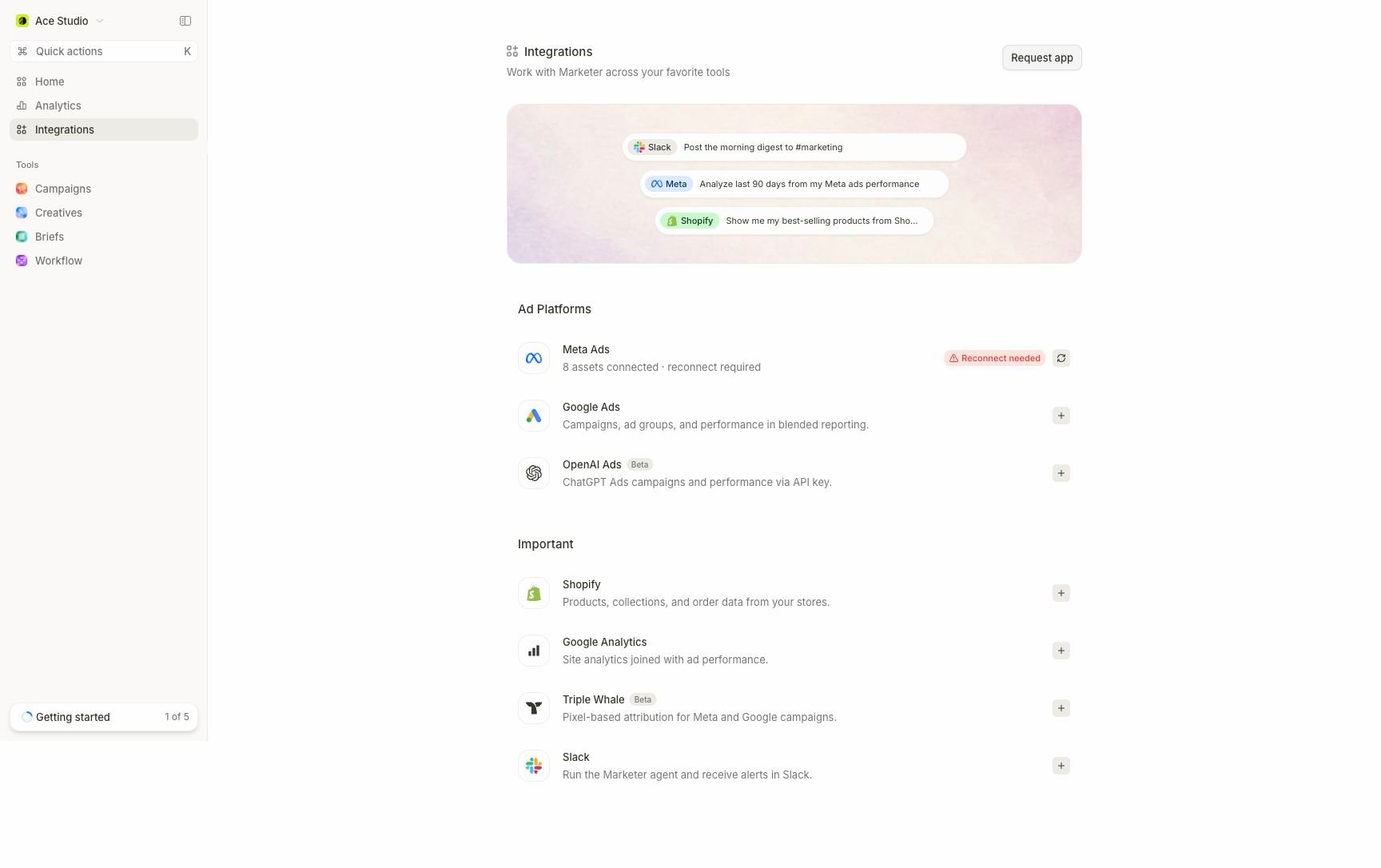 Select **Integrations** in the main navigation and open **Meta Ads** or **Google Ads**.
Continue through the provider flow with an identity that can access the intended account. Review the provider permissions before granting access.
Choose only the account or accounts that belong to this Marketer workspace. Similar account names are not enough; confirm the provider identity and account selection.
Look for **Connected**, then inspect the selected resources and the sync or data-coverage state shown on the provider detail page.
If the provider shows **Finish setup**, complete account selection. If it shows **Reconnect needed**, repair authorization before relying on its context. A connected badge alone does not prove the requested resources or dates are available.
## 3. Submit the first request
Return to **Home**. The composer sits beneath the workspace overview.
Select **Integrations** in the main navigation and open **Meta Ads** or **Google Ads**.
Continue through the provider flow with an identity that can access the intended account. Review the provider permissions before granting access.
Choose only the account or accounts that belong to this Marketer workspace. Similar account names are not enough; confirm the provider identity and account selection.
Look for **Connected**, then inspect the selected resources and the sync or data-coverage state shown on the provider detail page.
If the provider shows **Finish setup**, complete account selection. If it shows **Reconnect needed**, repair authorization before relying on its context. A connected badge alone does not prove the requested resources or dates are available.
## 3. Submit the first request
Return to **Home**. The composer sits beneath the workspace overview.
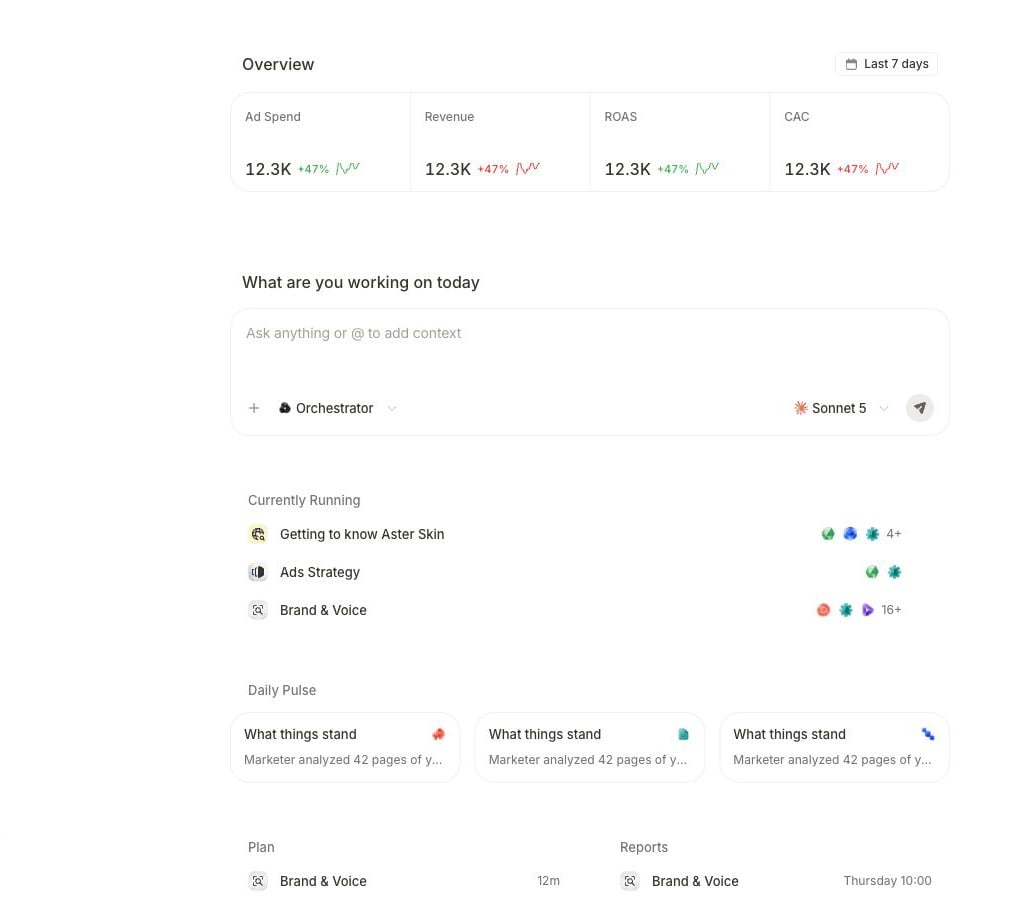 Paste this request into **Ask anything or @ to add context**:
```text theme={null}
Build a launch plan for [product or offer] around our strongest proven
differentiator. Use approved workspace Knowledge and only the connected
[Meta Ads or Google Ads] context for [provider account]. Return one positioning
direction, a focused campaign sequence, and a launch checklist. Name the
evidence you used, separate facts from assumptions, and flag missing context.
Keep everything as analysis and a plan. Do not create, edit, publish, pause,
or launch anything.
```
Select **+** and attach the exact product, brief, campaign, or creative when its identity matters. Saved Knowledge is available as workspace context; for a one-off document, select **Upload files** on Home. Use `@` to mention an agent, not to select a workspace record.
## 4. Follow the visible state
After you submit, Marketer can take one of these paths:
| What appears | What it means | What you do |
| --------------------------------- | --------------------------------------------------------------------- | ------------------------------------------------------------------------------------------------------ |
| A response in the conversation | The request can be answered directly | Let the answer finish, then review its evidence. |
| A task with visible steps | The request needs longer or coordinated work | Keep the task open or return through its task link; watch for input requests. |
| A clarification question | A required product, audience, source, account, or output is ambiguous | Answer the missing point without widening the task. |
| A proposal with decision controls | Marketer is asking permission to run displayed production work | For this plan-only quickstart, choose its edit or cancel branch rather than the displayed run control. |
| A connection or data error | The source is unavailable or does not cover the request | Return to **Integrations**, resolve the named prerequisite, and retry once. |
Do not start a second copy while the first task is active. A quiet conversation can still have work running behind its task detail.
## 5. Confirm the result
Paste this request into **Ask anything or @ to add context**:
```text theme={null}
Build a launch plan for [product or offer] around our strongest proven
differentiator. Use approved workspace Knowledge and only the connected
[Meta Ads or Google Ads] context for [provider account]. Return one positioning
direction, a focused campaign sequence, and a launch checklist. Name the
evidence you used, separate facts from assumptions, and flag missing context.
Keep everything as analysis and a plan. Do not create, edit, publish, pause,
or launch anything.
```
Select **+** and attach the exact product, brief, campaign, or creative when its identity matters. Saved Knowledge is available as workspace context; for a one-off document, select **Upload files** on Home. Use `@` to mention an agent, not to select a workspace record.
## 4. Follow the visible state
After you submit, Marketer can take one of these paths:
| What appears | What it means | What you do |
| --------------------------------- | --------------------------------------------------------------------- | ------------------------------------------------------------------------------------------------------ |
| A response in the conversation | The request can be answered directly | Let the answer finish, then review its evidence. |
| A task with visible steps | The request needs longer or coordinated work | Keep the task open or return through its task link; watch for input requests. |
| A clarification question | A required product, audience, source, account, or output is ambiguous | Answer the missing point without widening the task. |
| A proposal with decision controls | Marketer is asking permission to run displayed production work | For this plan-only quickstart, choose its edit or cancel branch rather than the displayed run control. |
| A connection or data error | The source is unavailable or does not cover the request | Return to **Integrations**, resolve the named prerequisite, and retry once. |
Do not start a second copy while the first task is active. A quiet conversation can still have work running behind its task detail.
## 5. Confirm the result
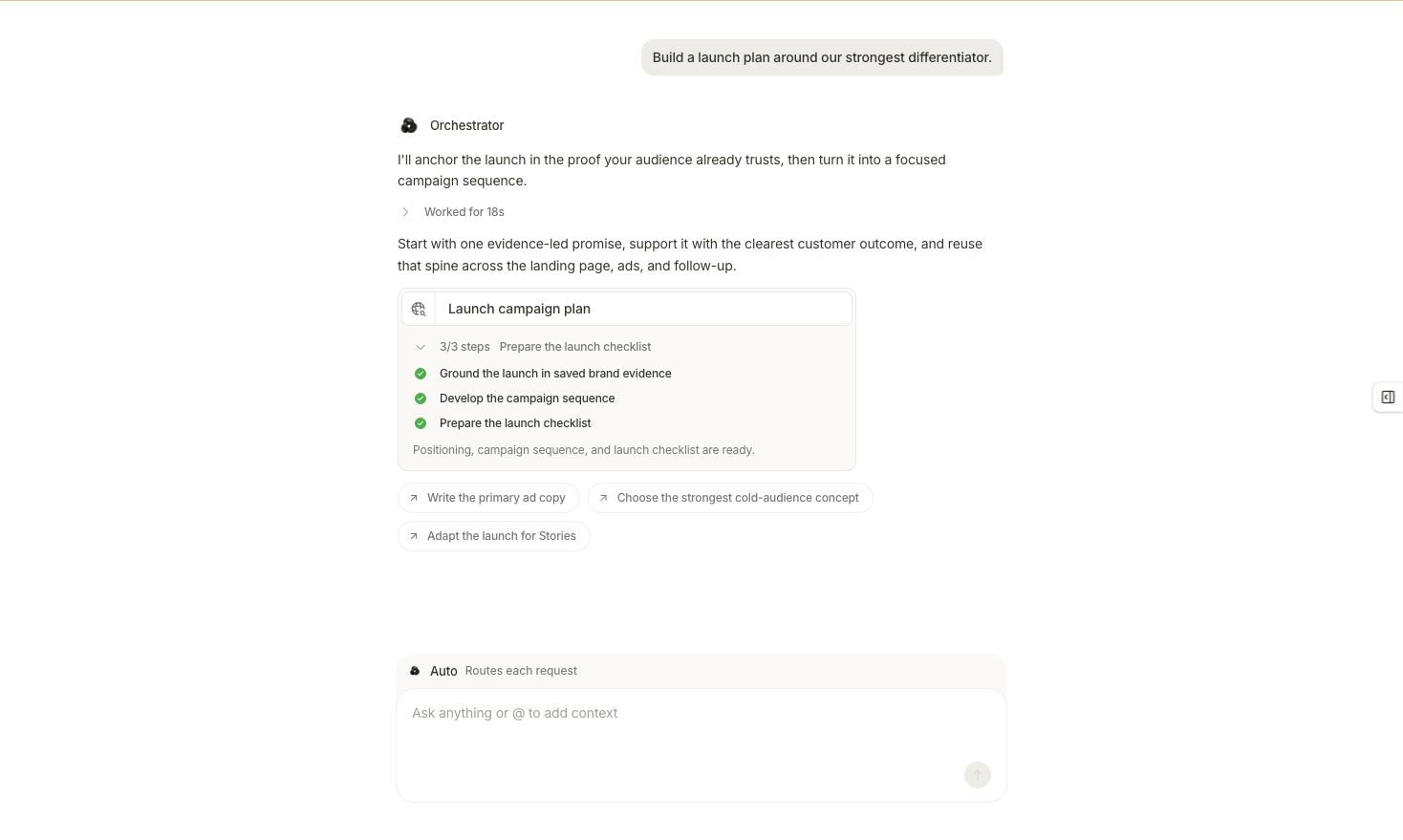 A successful first result includes or explicitly marks as missing:
* The intended product, offer, audience, workspace, and provider account context
* The exact evidence behind the central differentiator
* One focused positioning direction
* A campaign sequence that carries the same evidence-led promise
* A launch checklist with owners, inputs, tracking, creative, destination, budget boundary, and review steps
* Assumptions and unresolved inputs
* Confirmation that no campaign, creative, budget, or provider setting changed
Ask this follow-up if the evidence or action state is unclear:
```text theme={null}
Audit this launch plan before I use it. Name the exact source behind the central
differentiator, separate facts from interpretation, list every assumption and
missing input, and confirm the product, audience, offer, workspace, and provider
account context. State exactly what has and has not changed.
```
## If the result does not complete
| Problem | Next action |
| ------------------------------------------- | ---------------------------------------------------------------------------------------------------------------------------------- |
| The source or product is missing | Confirm the approved source is saved in Knowledge, attach the exact product when relevant, and retry. |
| The wrong account is used | Correct the selected provider account or name the intended account explicitly in a new request. |
| The differentiator is unsupported | Add or correct the authoritative source before generating another plan. |
| The task asks to create assets or campaigns | Keep the proposal unresolved, edit the request back to plan level, or cancel it. |
| The result is only a generic recommendation | Ask for the positioning direction, campaign sequence, launch checklist, supporting evidence, and limitations as separate sections. |
You are finished when the plan is reviewable and you can identify its evidence, scope, limitations, and action state without guessing.
Next, learn how to [set up workspace data in depth](/get-started/workspace-and-data), [follow the task deliberately](/get-started/first-task), or [review the result](/get-started/review-result).
## Related topics
- [Introduction to Marketer](/get-started/introduction.md)
- [Release notes](/release-notes/overview.md)
A successful first result includes or explicitly marks as missing:
* The intended product, offer, audience, workspace, and provider account context
* The exact evidence behind the central differentiator
* One focused positioning direction
* A campaign sequence that carries the same evidence-led promise
* A launch checklist with owners, inputs, tracking, creative, destination, budget boundary, and review steps
* Assumptions and unresolved inputs
* Confirmation that no campaign, creative, budget, or provider setting changed
Ask this follow-up if the evidence or action state is unclear:
```text theme={null}
Audit this launch plan before I use it. Name the exact source behind the central
differentiator, separate facts from interpretation, list every assumption and
missing input, and confirm the product, audience, offer, workspace, and provider
account context. State exactly what has and has not changed.
```
## If the result does not complete
| Problem | Next action |
| ------------------------------------------- | ---------------------------------------------------------------------------------------------------------------------------------- |
| The source or product is missing | Confirm the approved source is saved in Knowledge, attach the exact product when relevant, and retry. |
| The wrong account is used | Correct the selected provider account or name the intended account explicitly in a new request. |
| The differentiator is unsupported | Add or correct the authoritative source before generating another plan. |
| The task asks to create assets or campaigns | Keep the proposal unresolved, edit the request back to plan level, or cancel it. |
| The result is only a generic recommendation | Ask for the positioning direction, campaign sequence, launch checklist, supporting evidence, and limitations as separate sections. |
You are finished when the plan is reviewable and you can identify its evidence, scope, limitations, and action state without guessing.
Next, learn how to [set up workspace data in depth](/get-started/workspace-and-data), [follow the task deliberately](/get-started/first-task), or [review the result](/get-started/review-result).
## Related topics
- [Introduction to Marketer](/get-started/introduction.md)
- [Release notes](/release-notes/overview.md)