> ## Documentation Index
> Fetch the complete documentation index at: https://docs.marketer.com/llms.txt
> Use this file to discover all available pages before exploring further.
# Introduction to Marketer
> Learn how a request moves from workspace context to a reviewed result or controlled action in Marketer.
Marketer gives your team one place to ask questions, follow marketing work, review evidence, and decide what moves forward. Start on **Home**, give the Marketing Agent a clear outcome, and follow the work until you reach a result or a decision.
## Start on Home
Open [Marketer](https://app.marketer.com/dashboard) and confirm the workspace name in the upper-left corner before you submit anything. The active workspace determines which connected accounts, Knowledge, campaigns, briefs, creatives, products, and controls the agent can use.
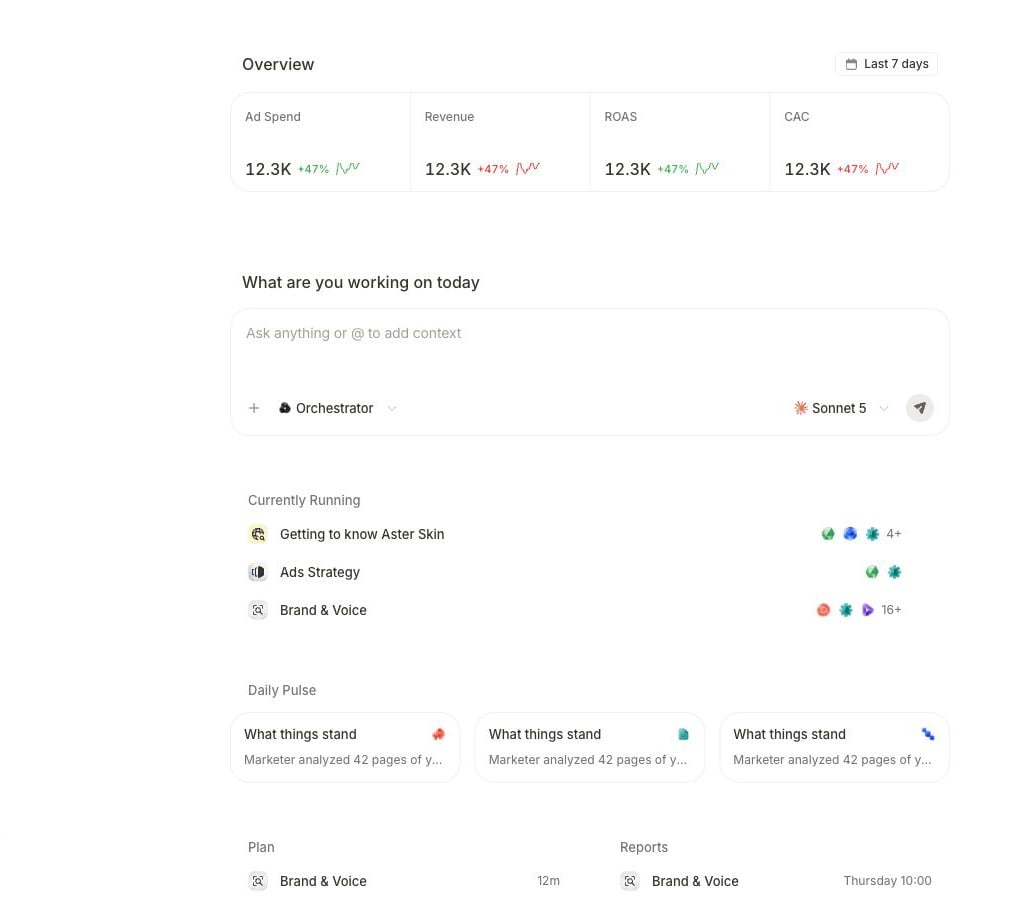 Use Home in this order:
1. **Confirm the workspace.** Switch workspaces if the visible name is not the company you intend to work with.
2. **Check the available context.** The overview and recent work help you see whether you are starting from the expected business state.
3. **Write the outcome.** Use **Ask anything or @ to add context** to describe the question, artifact, or decision you need.
4. **Attach the exact record when scope matters.** Select **+** and choose a campaign, brief, creative, or product instead of relying on a similar name. Use `@` to mention an agent.
5. **Follow the work.** A request can answer in chat, continue as a task, ask for clarification, or stop on a proposal that needs your decision.
## The product flow
Every useful request moves through the same five layers, even when the work itself differs.
| Layer | What you provide or inspect | What should be clear before you continue |
| ------------- | -------------------------------------------------------------------------- | ---------------------------------------------------------------------------- |
| **Workspace** | The company, members, connected accounts, Knowledge, and settings in scope | You are in the intended workspace and the required source is connected. |
| **Request** | Outcome, source, scope, date range, constraints, and action boundary | Marketer can tell what to produce and what it must not change. |
| **Work** | A direct response, task steps, specialist work, or a proposal | You can see whether work is running, waiting for input, or ready for review. |
| **Result** | The answer, report, brief, creative, workflow, or campaign work produced | The result matches the request and identifies the evidence that supports it. |
| **Decision** | Continue, revise, dismiss, approve, or verify in the owning surface | A recommendation is separate from permission to change an external account. |
### Answer flow
Use this for analysis and other read-only work:
1. Ask a bounded question on **Home**.
2. Let Marketer read the connected source and workspace context.
3. Open the completed result.
4. Verify its source, dates, scope, calculation, and limitations.
5. Ask a follow-up or continue in the relevant product area.
### Action flow
Work that can create or change something has an additional decision boundary. Marketer can show a proposed sequence before it runs.
At this state:
* Choose the displayed **Cancel** control when the proposed work should not continue.
* Choose **Edit** or **Edit brief** when the goal or steps need correction.
* Choose the displayed run control—such as **Accept & Run**, **Approve & Run**, or **Run it**—only after the scope, source, output, and downstream effect are correct.
The available controls depend on the task, your role, connected provider, guardrails, and workspace autonomy settings. A proposal is not evidence that anything has already changed.
## Know where work belongs
| You want to… | Start or continue in… | What you verify there |
| --------------------------------------------------- | --------------------------------------------------------------- | ----------------------------------------------------- |
| Ask a question or brief the agent | **Home** | Request, attachments, and response |
| Reopen a conversation or longer task | **Chats and tasks**, or the task link shown in the conversation | Current step, input request, and final result |
| Inspect campaign structure or prepare campaign work | **Campaigns** | Provider account, campaign object, state, and metrics |
| Explore performance | **Analytics** | Date window, source, filters, and metric definitions |
| Create or review creative work | **Briefs**, **Creatives**, and **Studio** | Brand context, output, and intended use |
| Make recurring work repeatable | **Workflow** | Trigger, inputs, destination, and review boundary |
| Connect data | **Integrations** | Authorization, selected resources, sync, and coverage |
| Resolve a pending decision | **Awaiting action** | Exact proposal, evidence, guardrail, and approver |
Names and available controls can vary with your workspace role, plan, connected accounts, and product state. Use the surface shown in your workspace as the source of truth.
## Your first complete loop
For the safest first session:
1. [Set up your workspace and data](/get-started/workspace-and-data).
2. [Build a plan-only launch task](/get-started/first-task) from approved evidence and one connected ads account.
3. [Review the result](/get-started/review-result) before you use it.
4. Move into campaign, creative, analytics, or workflow work only after the first source is trustworthy.
Follow the shortest path from sign-in to a verified result.
Give the agent the outcome, evidence boundary, and authority it needs.
## Related topics
- [Working with Marketer](/working-with-marketer/overview.md)
- [Slack](/integrations/slack.md)
- [Review results](/essential-guidelines/review-results.md)
- [Navigation and Quick actions](/working-with-marketer/navigation-and-quick-actions.md)
- [History and notifications](/working-with-marketer/history-and-notifications.md)
Use Home in this order:
1. **Confirm the workspace.** Switch workspaces if the visible name is not the company you intend to work with.
2. **Check the available context.** The overview and recent work help you see whether you are starting from the expected business state.
3. **Write the outcome.** Use **Ask anything or @ to add context** to describe the question, artifact, or decision you need.
4. **Attach the exact record when scope matters.** Select **+** and choose a campaign, brief, creative, or product instead of relying on a similar name. Use `@` to mention an agent.
5. **Follow the work.** A request can answer in chat, continue as a task, ask for clarification, or stop on a proposal that needs your decision.
## The product flow
Every useful request moves through the same five layers, even when the work itself differs.
| Layer | What you provide or inspect | What should be clear before you continue |
| ------------- | -------------------------------------------------------------------------- | ---------------------------------------------------------------------------- |
| **Workspace** | The company, members, connected accounts, Knowledge, and settings in scope | You are in the intended workspace and the required source is connected. |
| **Request** | Outcome, source, scope, date range, constraints, and action boundary | Marketer can tell what to produce and what it must not change. |
| **Work** | A direct response, task steps, specialist work, or a proposal | You can see whether work is running, waiting for input, or ready for review. |
| **Result** | The answer, report, brief, creative, workflow, or campaign work produced | The result matches the request and identifies the evidence that supports it. |
| **Decision** | Continue, revise, dismiss, approve, or verify in the owning surface | A recommendation is separate from permission to change an external account. |
### Answer flow
Use this for analysis and other read-only work:
1. Ask a bounded question on **Home**.
2. Let Marketer read the connected source and workspace context.
3. Open the completed result.
4. Verify its source, dates, scope, calculation, and limitations.
5. Ask a follow-up or continue in the relevant product area.
### Action flow
Work that can create or change something has an additional decision boundary. Marketer can show a proposed sequence before it runs.
At this state:
* Choose the displayed **Cancel** control when the proposed work should not continue.
* Choose **Edit** or **Edit brief** when the goal or steps need correction.
* Choose the displayed run control—such as **Accept & Run**, **Approve & Run**, or **Run it**—only after the scope, source, output, and downstream effect are correct.
The available controls depend on the task, your role, connected provider, guardrails, and workspace autonomy settings. A proposal is not evidence that anything has already changed.
## Know where work belongs
| You want to… | Start or continue in… | What you verify there |
| --------------------------------------------------- | --------------------------------------------------------------- | ----------------------------------------------------- |
| Ask a question or brief the agent | **Home** | Request, attachments, and response |
| Reopen a conversation or longer task | **Chats and tasks**, or the task link shown in the conversation | Current step, input request, and final result |
| Inspect campaign structure or prepare campaign work | **Campaigns** | Provider account, campaign object, state, and metrics |
| Explore performance | **Analytics** | Date window, source, filters, and metric definitions |
| Create or review creative work | **Briefs**, **Creatives**, and **Studio** | Brand context, output, and intended use |
| Make recurring work repeatable | **Workflow** | Trigger, inputs, destination, and review boundary |
| Connect data | **Integrations** | Authorization, selected resources, sync, and coverage |
| Resolve a pending decision | **Awaiting action** | Exact proposal, evidence, guardrail, and approver |
Names and available controls can vary with your workspace role, plan, connected accounts, and product state. Use the surface shown in your workspace as the source of truth.
## Your first complete loop
For the safest first session:
1. [Set up your workspace and data](/get-started/workspace-and-data).
2. [Build a plan-only launch task](/get-started/first-task) from approved evidence and one connected ads account.
3. [Review the result](/get-started/review-result) before you use it.
4. Move into campaign, creative, analytics, or workflow work only after the first source is trustworthy.
Follow the shortest path from sign-in to a verified result.
Give the agent the outcome, evidence boundary, and authority it needs.
## Related topics
- [Working with Marketer](/working-with-marketer/overview.md)
- [Slack](/integrations/slack.md)
- [Review results](/essential-guidelines/review-results.md)
- [Navigation and Quick actions](/working-with-marketer/navigation-and-quick-actions.md)
- [History and notifications](/working-with-marketer/history-and-notifications.md)